Basics
Definitions
- Multimedia database
- Database containing coherent multimedia objects
- Important operations of the multimedia database management system MMDBMS:
- Data storage
- Retrieval (IR system)
- Basic data type
- Text
- Image (raster graphic, vector graphic)
- Audio (e.g., speech, music, MIDI)
- Video
- Documents
- Media object/type
- Document of only one basic type (e.g., image)
- Multimedia object
- Document composed of different media objects
- Integration of different media types
- Example: Book (text and image)
- Media object/type
- Medium
- Information carrier in communication connection
- Medium transfers multimedia data
- Independent of information
- Interchangeable
- Example:
- Book (author-to-reader)
- Voice (speaker-to-listener)
- Medium classification
- Receiver type
- Optical/visual
- Acoustic
- Haptical
- Olfactory (smell)
- Gustatory (taste)
- Time
- Static
- Dynamic
- Receiver type
- Metadata
- Task: Describe content
- Standardized by MPEG-7/MPEG-21
- Advantage
- Good quality
- Existing techniques
- Disadvantage
- Manual annotation (expensive)
- Retrieval effectiveness relies on metadata quality
- Hard to describe images
- Low-level feature
- Describe object with information loss
- High-level feature
- Transform object into another domain
- Object can be completely reconstructed
Applications
- YouTube
- Surveillance
- Face recognition
- Image search
- Legal issues (copyright infringement)
History
- 1960/70: Retrieval for text documents (IR)
- 1970/80: Relational databases + SEQUEL
- 1980/90: Increasing presence of multimedia objects
- 1990/2000:
- SQL-92 introduces BLOBs
- First multimedia databases
Requirements of an MMDBMS
- By Christodoulakis, 1985
- Requirements
- Classical database functionality
- Maintenance of unformatted data (binary data)
- Special storage and presentation devices
- Aspects to comply with requirements:
- Software architecture (extension, e.g., build on top of RDBMS, or new software)
- Content addressing (identification of objects, i.e., through content-based features)
- Performance (indexes, optimization, etc.)
- User interface (query interface, UI)
- Information extraction (generate content-based features (automatically))
- Storage device (capacity, redundancy control, compression)
- Information retrieval (extended search functionality)
Storage
- Storage should be persistent
- Storage model
- Stand-alone (file system)
- Database storage (provide advantages of databases)
- Declarative query language
- Orthogonal combination of query functionality (???)
- Query optimization
- Index structures
- Transaction system
- Recovery
- Commercial systems
- Relational extension: BLOB
- Binary large object (not interpreted)
- Special field type
- Retrieval using metadata added next to BLOB
- Object-relational extension
- Feature to enhance retrieval functionality
- Add object-oriented model to relational DB
- Add semantic search
- e.g., IBM DB2 Extender
- Add UDFs, UDTs
- Relational extension: BLOB
Retrieval
- Types:
- Exact match (not practical for IR)
- Best match (similarity)
- Options:
- Metadata-based (classic, e.g. MPEG-7)
- Relational metadata (e.g., author, size, location)
- Content-descriptive (not content itself)
- Pro:
- Good quality
- Automatic generation (e.g., by camera: location, time)
- Use existing techniques
- Efficient
- Contra:
- Annotation is expensive (e.g., author, content)
- Content description not accurate enough (Granularity of details, e.g., spider vs. insect)
- Number of details (is everything described?)
- Content-based
- Use content of media objects
- Text: Standard IR methods
- Audio/video/image (complex multimedia objects)
- Metadata-based (classic, e.g. MPEG-7)
- Goal: Content-based retrieval
- Key questions:
- What carries semantic information?
- What are meaningful features?
- What describes the object?
- What are meaningful similarity/distance measures?
- Search functionality
- Semantic
- Focus on perception
- Use meaningful/semantic features
- Use meaningful similarity/distance measures
- Orthogonal integration of classical/extended functionality
- Classical: Metadata
- Extended: Content-based
- No direct access to media objects (use features)
- Use content-based features (extraction, normalization, indexing)
- Efficiency
- Semantic
Workflow
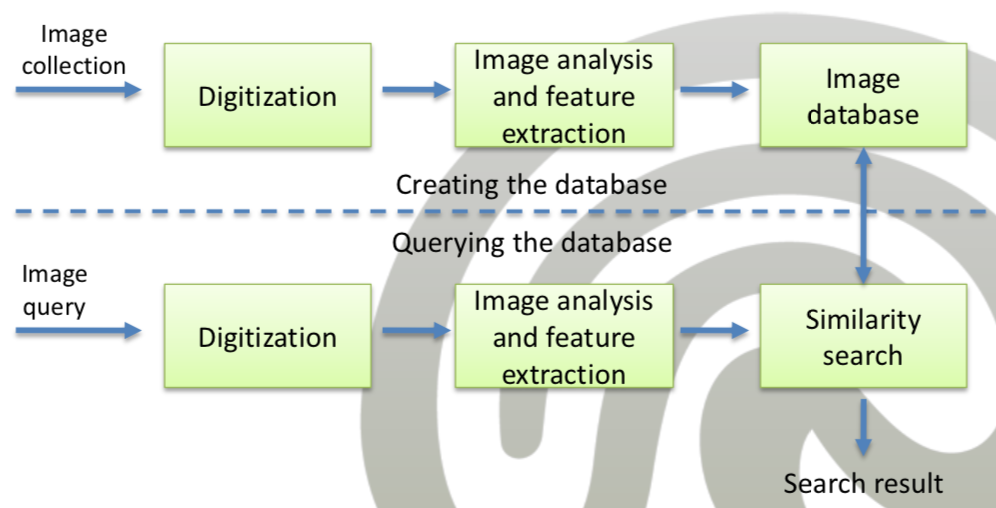
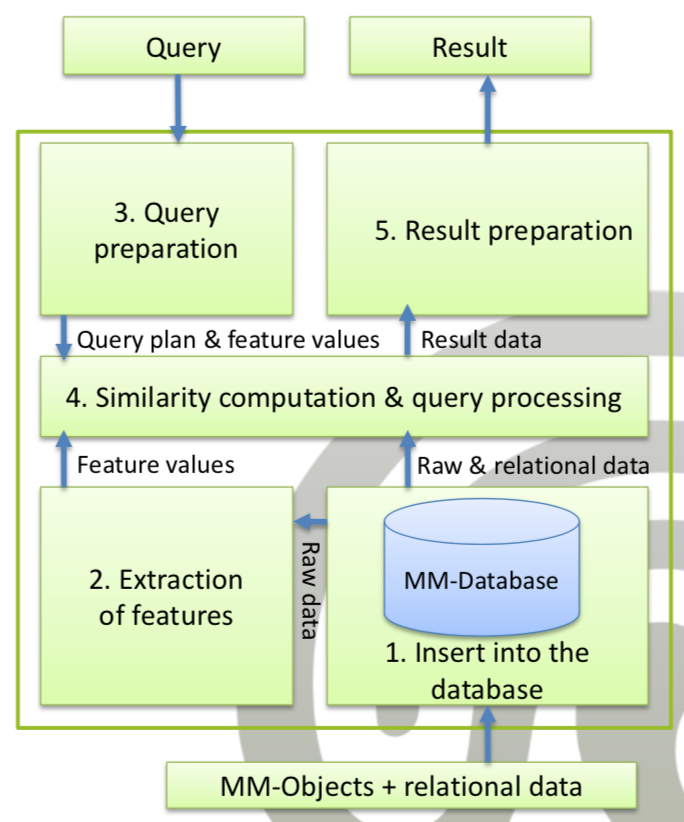
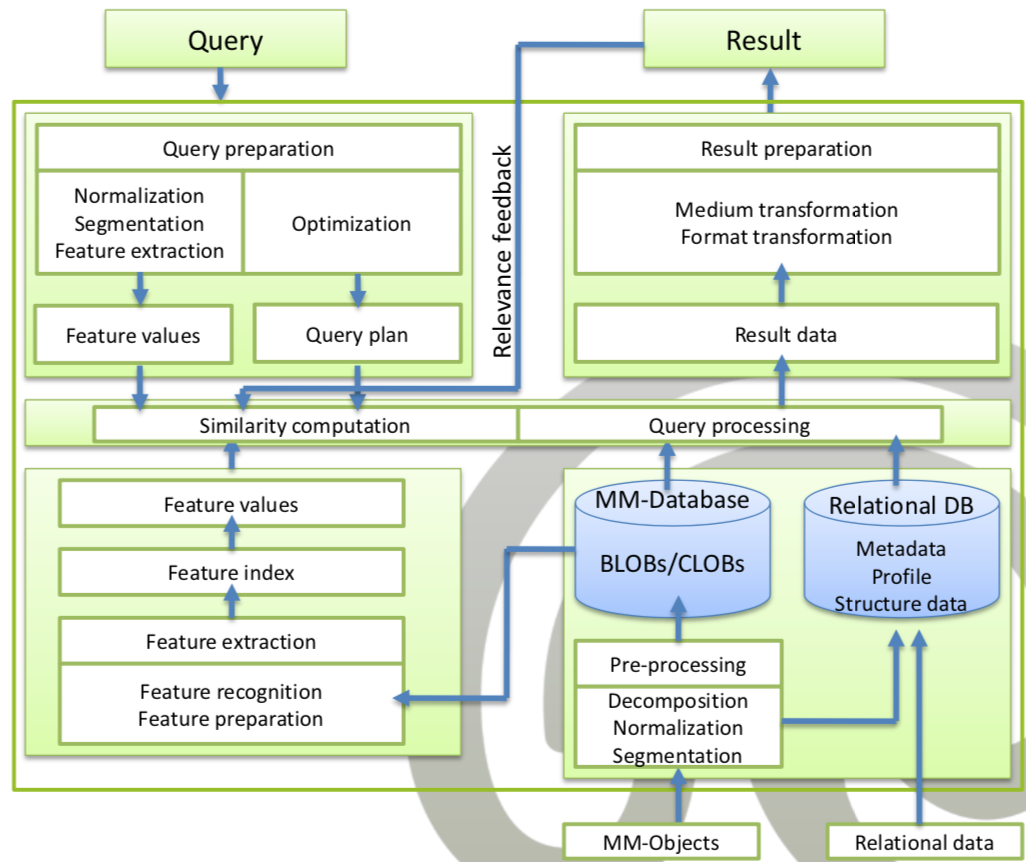
- Preprocess content
- Extract features
- Extract metadata
- Receive query
- Preprocess query
- Extract features
- Compute similarity between query and database objects using features
- Rank results
- Return results (user-friendly presentation of results)
Queries
- Example types
- Keywords
- Query by example
- Video query
- Heterogeneous (e.g. people photographed with X)
- Dimensions for classification
- Static/dynamic
- Passive/active
- Standard/content-based retrieval
- Types:
- Static: High read rate
- Dynamic: High modification rate
- Passive: DB reacts on queries
- Active: DB acts, triggers application level
- Standard search: Metadata search
- Retrieval functionality: Content-based search
Feature Selection
- Feature selection:
- Usually, evaluate a combination of different features
- not a single, too weak as description
- not all, i.e., only use sufficient features
- Requirements for features:
- Significance:
- Feature(s) should have certain meaning
- Significance of color/loudness/…
- Differentiation:
- Feature(s) should allow us to differentiate between the objects
- Significance:
- Low-level-features may not provide good differentiation (e.g., sunrise vs. sunset)
- Usually, evaluate a combination of different features
- Important: Multimedia objects are (often) interpreted as signals
Evaluation
- Efficiency (query-independent)
- System resources (Memory, CPU, I/O operations, Response time)
- Depends on hardware
- Scalability
- Goal: Efficient enough
- Effectivity (query-dependent)
- see below
- Focus is application-dependent
Effectivity
- Query-dependent evaluation
- Result quality (with objective metrics)
- Important for the Usage of system
- Important: Relevance (here: binary concept)
- Requires implicit information need
- Usefulness
- Usability
- User-friendliness
- Usage of gold standards/ground truths (created by experts)
- Not in focus of this course
- Result sets
- False positives/False alarms
- Increase result set
- False negatives/False dismissals
- Not contained in result set
- Problem, because not identified by user
- Correct alarms/True positives
- Correct dismissals/True negatives
- False positives/False alarms
- Confusion matrix: Matrix with four fields (TP, TN, FP, FN)
- Metrics:
- Precision (\( 1 \) is best)
- \( P=\frac{TP}{TP+FP} \)
- Recall (\( 1 \) is best)
- \( R=\frac{TP}{TP+FN} \)
- Precision (\( 1 \) is best)
- Consider both metrics at same time
- Precision-Recall-curve
- Use multiple queries to compute the average (e.g., mean-average precision)