Basic Client-Side Technology
Session Management
- Motivation:
- Problem: HTTP is stateless
- Static content: No problem
- Dynamic content impossible (e.g., shopping cart)
- Goal: Session management
- Session: Period of activity between a user and computer
- Session ID: Random number (hexadecimal, should be unique) identifying the session
- Server: Mapping between session ID and user
- Approaches
- HTTP Authentication
- Session ID in URL
- Cookies
HTTP Authentication
- Idea: Use HTTP authentication (send credentials via request)
- Problem:
- Session end can’t be determined
- Non-trivial logout (browser always sends authentication)
- Authentication provided by Web server (not application)
Session Identifier in URL
- Server generates session ID on first page visit
- Important: Session ID should be in all links
- e.g.,
http://example.org?cart.html?sess=97275948
- e.g.,
- Problem:
- Link sharing (leakage of session ID)
- Referer header contains session ID (leakage)
- URL rewriting prone to errors
Cookies
- Cookie: Key-value-pair of text
- e.g.,
Set-Cookie: foo=bar; HttpOnly
Directives
Expires=<date>- Set date of expiry
- e.g., deletion
Domain=<domain>- Host to which the Cookie will be sent
- Default: Set only for current domain (not including subdomains)
- If specified, then subdomains are included
- Default Internet Explorer: Set cookie for all sub-domains
Path=<path>- Send Cookie for specific paths/sub-paths
- e.g.
/docs
HttpOnly(disallow JavaScript access)Secure- Transmit only over secure HTTPS connection
- Can only be set from a secure HTTPS connection
SameSite=Strict/Lax/None- Control cross-origin requests (protection against CSRF)
None:- Send cookies with same-site and cross-site requests
Strict:- Only send cookies if origin site is the site that set the cookie
- Never send with cross-origin requests
- E.g., even following a link
Lax:- Only send cookies with GET/HEAD/OPTIONS
- Default in modern browsers
Lifecycle
- Server
- Generates session ID on first visit
- Sent via
Set-Cookieheader
- Client
- Saves cookie persistent
- Always sent cookie to server
- Regardless of referrer
- See
Expiresoption - Default: Delete cookie on browser close
- End: Delete cookie/delete server state
Form-based Authentication
- Default of today’s applications
- Workflow
- Server provides HTML form
- User fills form
- If correct, server sets session cookie
- Problem: Password field (simple text field)
- Accessible to JavaScript
- Content sent in clear text to server
Problems
- Cookies were not designed for security
- Cookies readable/writeable from JavaScript (except
HttpOnly) - If set for a domain, valid for all subdomains
- Sent with any requests (see
SameSite) - Security problems:
- Session Hijacking (attacker steals session ID from victim)
- Session Fixation (attacker palms session ID off on victim)
- Cross-Site Request Forgery
- Cross-Site Script Inclusion
JavaScript
- JavaScript core (ECMAScript, the language)
- Document Object Model (API to the rendered HTML document)
- Browser APIs (Math, WebStorage)
JavaScript Core
- Properties
- Functional
- Prototype-based object model
- No class hierarchy
- No concurrency model (single-threaded, event-driven concurrency)
- Allows for closures (anonymous function with context)
- Allows for anonymous functions
JavaScript in HTML
- Parsing blocks:
- Script-tag (
<script>...</script>) - Script-tag with source (
<script src="..."></script>) - Event handlers (
<a onclick="...">Foo</a>)
- Script-tag (
- Execution error:
- Parsing block is skipped
- Other blocks are not affected
- HTML rendering is stopped until script is executed
- Scripts run in same global space (including page)
JavaScript Objects
- Dynamic typing
- Implicit type casting
- Types:
- Primitive types (strings, numerical)
- Object types
- Objects are instances of functions
- e.g.,
function a(){}; var x new a();
- e.g.,
- Getters/Setters using
defineProperty - Almost everything has
toString()
Prototype-based Object Model
- Objects have
prototype - Prototype chaining:
- Prototype may have prototype as well
- Function call is propagated until found or prototype is
null) - Objects point to superclass prototype via
__proto__ - Behavior is dynamic:
- Prototype change affects existing objects
- Prototype can be set during runtime
Variables
- Scoping:
- Global:
- Variable without
var - Variable with
varin top-level script
- Variable without
- Local:
- Variable with
varinside function
- Variable with
- Global:
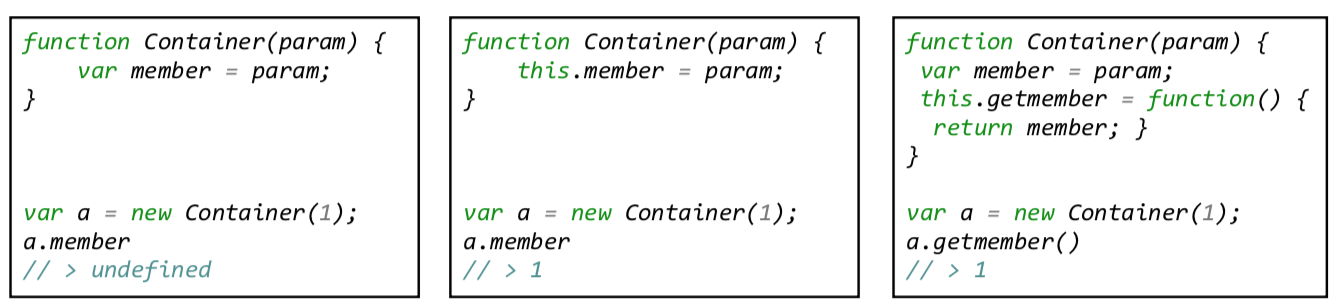
- Members:
- Public:
this- Available from outside
- e.g.,
this.member = param
- Private:
var- Not accessible from outside
- Public:
- Properties can be added with
defineProperty(obj, name, func) - Property
configurable: boolprevents from modification (raises TypeError)
Document Object Model
- Interface to a rendered HTML/XML page
- Connection between scripts and the loaded page
- Links multiple, other interfaces
- Global object:
window
Document Interface
- Name: Document Object Model
- Using
documentinterface - Representation of rendered document
- HTML tree consists of
HTMLElementnodes - HTML properties are mapped to HTMLElement object
- Methods to manipulate document:
document.write(content)element.innerHTMLelement.<attribute>element.appendChild(c)
- Frames in same window:
window.parent,window.frames[],window.top - Popups:
window.open(url)
Location Interface
- Provide URL information
- Members:
href: Complete URL including fragmentprotocol: Protocolhost: HTTP host with porthostname: HTTP host without portport: port of HTTP hostpathname: Pathsearch: URL queryhash: Fragment
- Encoding behavior:
- Chrome: Everything since 65.0 (before: everything except fragment)
- Firefox: Everything
- IE: Nothing
Other APIs
- Navigation (
historyobject) - WebStorage API
- XMLHttpRequest API
- Browser information
- e.g., User-Agent, Plug-ins
navigatorobject
- Screen
- e.g., dimension, color depth
screenobject