Cross-Site Scripting
Basics
- Attacker injects script into another site (cross-site)
- e.g., using HTML code containing JavaScript
- Goal: Usually, steal sensitive information of the user (attack confidentiality)
- Script runs in origin of vulnerable site
- Confused-deputy attack (all privileges of the browser/origin)
- Dimensions:
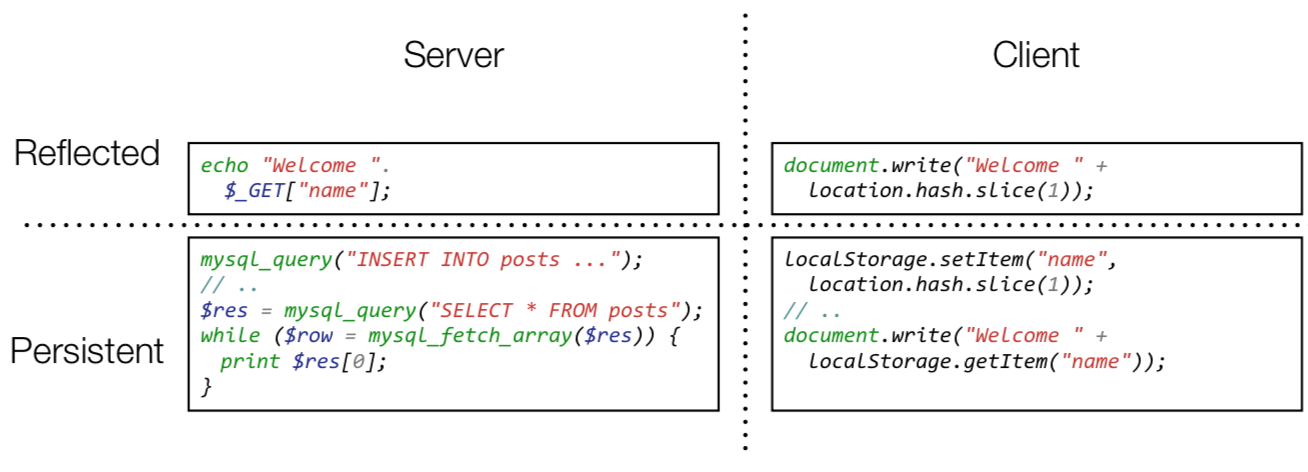
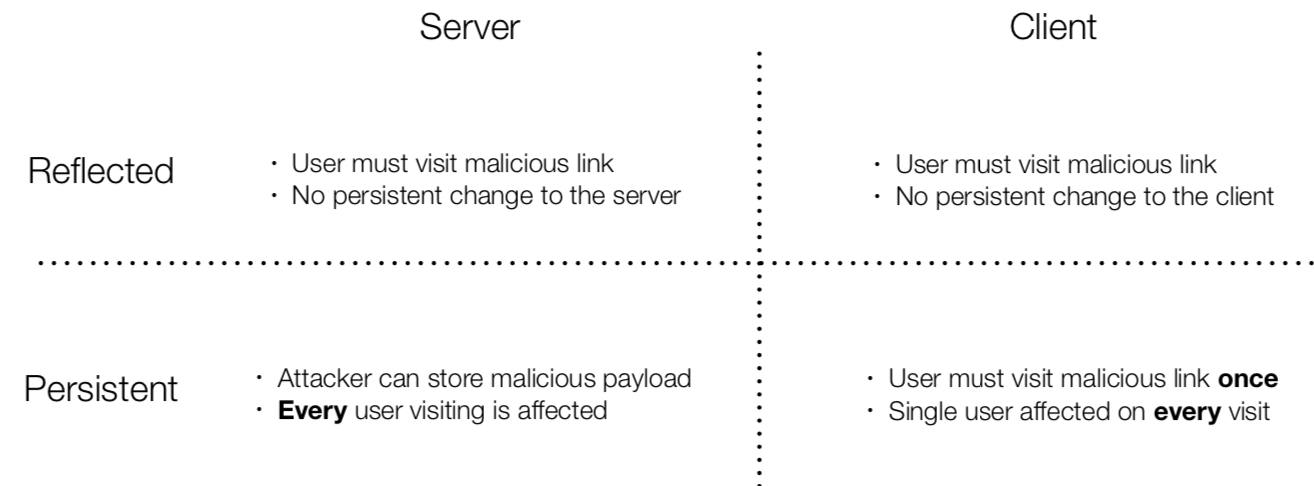
- Persistence of injected code (reflected vs. persistent)
- Location of the vulnerable code (server vs. client)
- Main problem:
- Data interpreted as code (basically for all injection attacks)
- Browser trusts the received code
- Main attack against websites
- Countermeasure: Sanitization
History & Attacks
- 1997: First attack found (by IAS)
- XSS was not discovered
- 1999: Discovered (Reflected SSXSS in 404 Pages)
- 2005: Name proposed
- Initially, DOM-based XSS
- Nowadays called Client-side cross-site scripting
- 2005: MySpace Worm (SS P XSS)
- Attack: Inject HTML in profile page
- Payload added Samy Kamkar as friend
- Injected code for friends
- 2013: Ubuntu Forums (SS P XSS)
- Vulnerability in vBulletin software
- XSS in announcements (sent link to admins)
- Attacker stole cookies
- 2014: Password managers
- Browsers auto-fill forms
- Attack: Fill form, wait for browser to fill
Impact
- Capabilities of JS in its context (powerful):
- Full control over DOM
- Full access to browser state (e.g., cookies, storage, …)
- Read/write HTTP requests within the SOP
- JS can pretend to be the
- User towards server (e.g., post content)
- Server towards user (e.g., modify page behavior)
- Possible attack: Session Hijacking
- Also called Session ID Theft
- Goal: Steal session cookie of the user
- XSS can be used to perform a session hijacking attack
- Mitigation: Use HTTPOnly cookies
Injection
- Primary methods for script injections
- Inline scripts
- External scripts (e.g., attacker controls CDN)
eval(attackerinput)
- Examples:
- Tag injection
<b>$var</b>$var = '<script>...</script>'
- Break out of attributes
<img src="$var" />$var = 'foo.jpg" onerror="javascript:alert(1)'
- Javascript URLs
<iframe src="$var" />$var = 'javascript:alert(1)'
- In-script injection
<script>var a = $var<script/>$var = '0; evil();'<script>var a = 0; evil();<script/>
- Tag injection
Server-Side
Reflected
- Attack:
- User visits malicious link (containing an attack)
- Server insert GET-Parameter into page
- No persistent change on server side
- Workflow:
- Attacker finds vulnerability (i.e., probe request parameters)
- Attacker creates malicious payload (e.g., steal cookie)
- Attacker tricks user into visiting link
- Email with link
- iframe on his page to vulnerable site
- Attack code is reflected from server and sent to the victim
- Common errors:
- Insert GET-parameter into HTML
- e.g., search fields
echo '<input type="text" value="'.$_GET["query"].'">';
- Insert request URI into HTML
- e.g., custom error page
echo 'The URL '.$_SERVER['REQUEST_URI'].' could not be found';
- Insert GET-parameter into HTML
Persistent
- Attack:
- Attacker stores malicious payload at vulnerable server site
- Payload printed on website (e.g., SQL written to page, every user is affected)
- Workflow
- Attacker finds vulnerability (e.g., inject HTML or JS code into request parameters, then test it)
- Web server inserts malicious payload into database
- Every user is attacked
- e.g., guestbook, forums, profile page, book descriptions on Amazon
- Countermeasures:
- Input validation/sanitization
- e.g., allow-list of characters (very hard to be correct)
- Simple replacement does not suffice
- Encode/escape output
- PHP
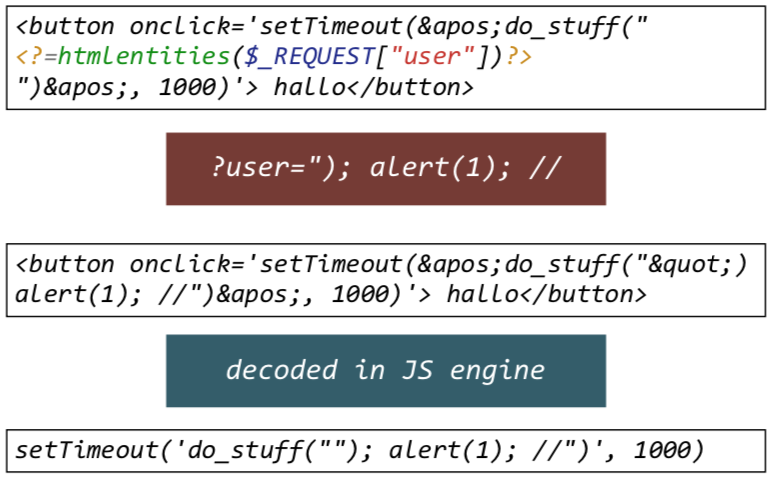
htmlentities(str)- Encode characters to HTML entities
- Does not encode single quot
- HTML parser decodes HTML entities
- PHP
- SQL Prepared Statements
- Avoid creating own filters (frameworks have context-aware filters, read manual)
- Prohibit user-provided markup (e.g. use Markdown, BBCode, etc.)
- Disable error reporting to Web frontend
- Input validation/sanitization
Client-Side
- Insecure APIs:
- Write new tags:
document.write(...)document.writeln(...)
- Execute JavaScript:
eval(...)setTimeout(...)setInterval(...)
- Add event handlers:
.innerHTML.outerHTMLinnerHTML/outerHTMLdoes not execute scripts- Event handlers are executed (e.g.,
<img onerror="..."/>
- Write new tags:
- Attacker-controllable sources:
- URL
- Referrer
- Cookies
window.name(site could callwindow.name)- postMessage
- Causes for Client-side XSS (study, CSS15):
- 65 % first-party code
- 21 % third-party code (Problem: Code is transferred to including domain)
- 14 % combination of both
- Prevention:
- Do not use insecure APIs
- Do not use user-provided input directly
- Do not allow tainted code in JavaScript
- Policy:
- Never interpret data as code
- Only use data as literals
- Use existing APIs (e.g.,
JSON.parse)
Reflected
- Attack:
- User visits malicious link (i.e., using fragment identifier)
- No persistent change on client-side
- Important: No attacker data is sent to server
- Workflow:
- Attacker analyzes JavaScript code for vulnerabilities
- e.g., unfiltered data in URL
- Attacker tricks victim into visiting the page with vulnerable JavaScript via link
- Victim’s browser executes JS code
- Attacker analyzes JavaScript code for vulnerabilities
- Countermeasures:
- If fragment identifier used, check using regex
Detection
- Problem:
- Static analysis fails when
evalis used - Prototype chaining difficult to analyze
- Static analysis fails when
- Abstraction:
- XSS is insecure data flow from attacker-controllable sources to security-critical sinks/APIs
- Solution: Dynamic analysis (i.e., taint checking)
- Taint checking
- Type of dynamic analysis (i.e., monitor information flow)
- Goal: Derive where security-critical variables are used (low-security input)
- Variable is tainted and then tracked
- Variables which are set by a tainted variable are tainted as well
- Contexts for XSS:
- HTML context: Requires script tag
- JS context: Requires JS statements
- URL context: Requires
javascript:URL
- Steps of an attack:
- Break-out:
- Leave context (e.g.,
";}) - Depends on context (HTML elements, script-tag, URL)
- Leave context (e.g.,
- Exploit:
- Perform exploitation
- Independent of context
- Break-in:
- Re-enter context (e.g., close brackets, comment rest of JS
//) - Depends on context
- Re-enter context (e.g., close brackets, comment rest of JS
- Break-out:
Persistent
- Attack:
- User visits malicious link once (e.g., write to WebStorage/cookie)
- Causes persistent change on client-side / user is affected on every visit (e.g., read from WebStorage)
- Workflow:
- Attacker analyzes JavaScript code for vulnerabilities
- URL flowing into persistent storage (e.g., WebStorage, Cookies)
- Execution of persistent storage (e.g., Cookie used in eval-statement)
- Attacker tricks victim into visiting page (e.g., with fragment, data is stored)
- On each page visit, the victim’s browser executes the malicious JS
- Attacker analyzes JavaScript code for vulnerabilities
Mitigation in Browsers
- Approaches
- Internet explorer (Built-in XSS filters)
- Firefox Extension NoScript (too many false positives)
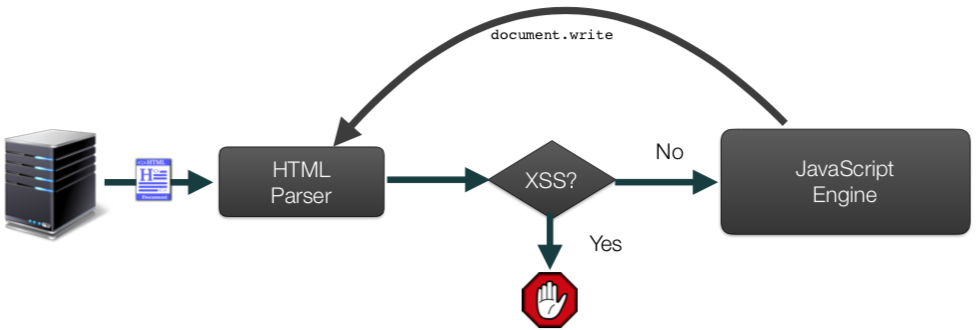
- Chrome XSSAuditor
- Chrome XSSAuditor
- State-of-the-art
- Low performance overhead
- Reasonable false negatives
- Audits
document.write - Ignores
innerHTMLfor performance reasons
- Mutation-based XSS
- Stackoverflow
- Browsers aim for compatibility: HTML is corrected by browser
- Browser changes HTML and bypasses XSS sanitizers