Client-Side Security
Cross-Site Request Forgery (CSRF)
- Also called session riding, Sea Surf, XSRF
- Attack: Attacker creates request in the name of a user
- Topic: Session management
- Cookies are always sent with each request
- Neither browser nor server decide when cookies are sent
- Sessions are state on server (can be modified)
- XSS is broader attack
- User being a victim to XSS could be victim to CSRF
- XSS can create CSRF attacks
- But: CSRF possible without script injection (user visiting the site of the attacker)
- Example:
- Bank uses cookies for session management
- Form with transaction data is sent with cookies
- Attack:
- User visits malicious site
- Site could send request to bank to submit transaction (including the session cookie)
- Problem: Servers accept requests from outside their domain
Attack
- Exploit trust of a server having in the user’s browser
- Works with GET and POST (e.g., image tag, iframes, css, scripts)
- Requirements:
- User is logged in on target site
- User visits a site which has a CSRF attack against the target site
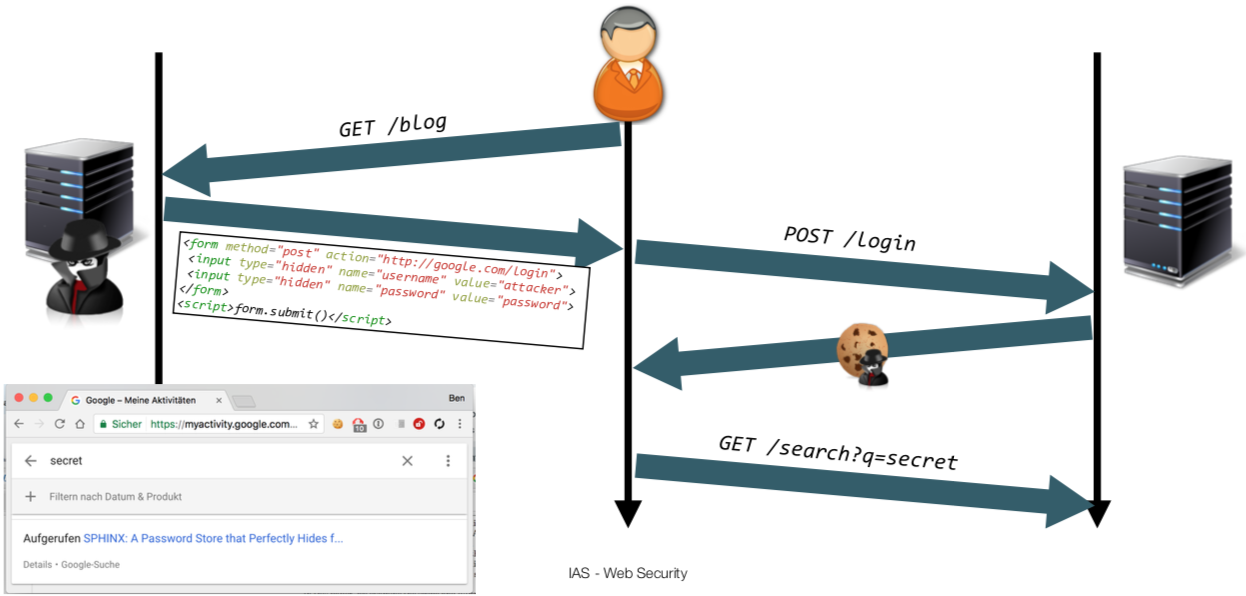
- Login CSRF
- CCS, 2008
- Special case
- Attack confidentiality
- Attacker logs user into attacker’s Google account and can monitor the user’s behavior
- e.g. Google search
Examples
- 2006: Digg.com (User likes a certain post)
- 2007: WordPress (Arbitrary code execution)
- 2007: GMail filters (forward mails)
- 2013: TP-Link routers (configuration changes; DNS server change)
- … a lot more …
Prevention
- Check
Refererheader (naive) - Check
Originheader - CSRF-Token
- Double CSRF Token
- Custom header
SameSitecookies
Referer-Header Checking
- Naive approach
- Server could check
Referer-header of request - Problem:
- Header is not always present
- Header can be stripped by attacker
- Header can not be set by attacker but
- e.g., using a
data:URL - e.g., using the Referrer-Policy of Chrome
- Not privacy-conform
- What behavior if header is missing?
- Trade-off between utility vs. security
- e.g., Reject or accept?
Origin-Header checking
- Check
Originheader (does not contain complete URL, privacy-friendly) - Currently, only sent with XMLHttpRequest, WebSockets
- Problem: Wide-spread adoptions is unlikely
CSRF-Token
- Server generates random token for user
- Stored in session (server-side)
- Form contains hidden token (sent from server)
- Client sends token with request to server
- Server compares sent token with the stored token
- Protection:
- Attacker doesn’t have token
- Origin of request is the same as the origin of the server (because server sent the token)
- Problem: With an XSS, attacker could read token (obviously)
Double Submit Cookie
- Called Stateless CSRF Defense
- Idea: Token contained in cookie and form
- Important: Token sent in cookie
- Server generates token
- Send in cookie (
HttpOnly) and form - OR send in cookie only (not
HttpOnly) and JavaScript inserts token into form
- Send in cookie (
- Client sends cookie token and form token to server
- Server compares both cookies
- Advantage: Server is stateless
- Problem: Cookie tossing
- Scenario: Attacker controls sub-domain
- Attacker may set cookie token value for parent-domain
Custom Headers
- Idea:
- Use XMLHttpRequests for state-changing requests (with custom header)
- Only handle request if the custom header is set
- e.g.
X-My-CSRF-Header
- e.g.
- Protected via Same-origin policy and CORS
- SOP: Same-origin requests allowed (for own site)
- CORS: Cross-origin requests can be allowed (Allow-list certain origins)
- Advantage:
- No server state required
- No randomness required
- Disadvantage:
- Change application
SameSite cookies
- SameSite is cookie option
Strict:- Never send cookies in cross-origin request
- e.g., link to facebook.com would not send cookie
Lax(default):- Cookies are send along safe request (GET, HEAD, OPTIONS, TRACE)
- Cookies are not send with
POST,PUT,DELETE - Protection against POST-based CSRF
- No Protection against GET-based CSRF
Cross-Origin Data Leakage
- Goal: Attack confidentiality
- Attack:
- User visits malicious site
- Malicious site requests a JS file in the
scripttag (SOP isn’t applied here) - Malicious site steals information from the embedded JS file
JSON/JavaScript Hijacking
- 2006
- Request JSON file with JS
- e.g.
<script src="file.json"></script>
- e.g.
- Overwrite
Array()function to steal JSON data - Fixed nowadays
Cross-Site Scripting Inclusion (XSSI)
- Attack:
- Server sends data within JS files (if user is logged in)
- Attacker overwrites executed functions
- Attacker includes the script and extracts the information
- Compare to JSONP
- Exploits
- Registered global variable (and print them)
- Trivial case
- e.g.
window.result_of_secret = ''
- Overwrite global functions/prototypes/prototype functions
- e.g.,
Array.prototype.forEach - e.g., using
thiswithin callbacks - e.g.,
Function.prototype.call - e.g.,
Object.prototype.toString()
- Registered global variable (and print them)
- Identification
- USENIX, 2015
- Apply to each cross-origin request
- Send two requests (one with cookies, one without cookies)
- Diff the result sizes
- If difference is large enough, data is sent with the Cookie-Request
- Real-world examples:
- Stolen credit card info
- Reading emails
- Account data stealing from hosting services
- Prevention
- Restrict the loading of sensitive scripts from other origins (e.g., tokens, see CSRF protection, CORS)
- Do not send data with JavaScript (use extra service)
- Receive data using XMLHttpRequest (protected using SOP/CORS)
- Use inline scripts only + CSP nonces
- i.e., add data into script-tag in HTML page of original site
- No external script ==> no leakage of information
- Examples:
Array.prototype.forEach = function(callback) { console.log(this); }arguments.callee.caller: Reference to who called meObject.defineProperty(Function.prototype, 'toString', {writable: false});
UI Redressing / Click Jacking
- Attack:
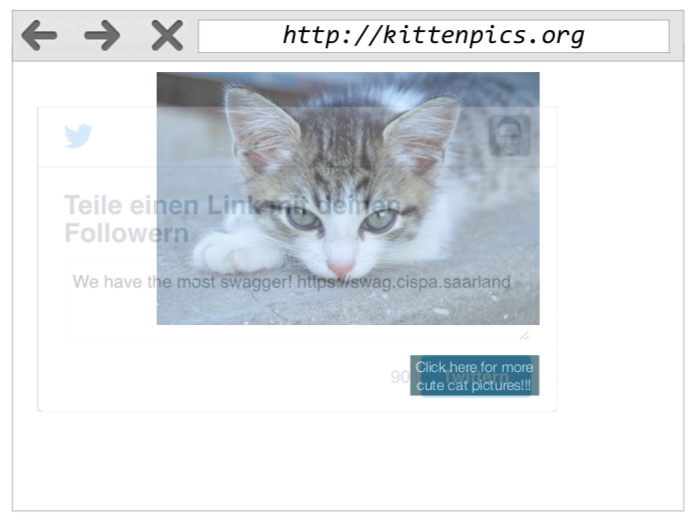
- Trick user into clicking on something without noticing
- Usually, another site is framed and the including page controls most of the frames property
- Weakness:
- Framing is controlled by the including page (position, size, visibility, timing, …)
- Example:
- Overlay site with iframe with tweet which should be posted
- iframe is almost invisible
- Behind the “SEND” button of the frame is a “PLAY” button
- Improvement:
- Let iframe follow mouse movement (frame can navigate the
topframe) - Double Framing (frame inside the frame, bypass
X-Frame-Options: SAMEORIGIN)
- Let iframe follow mouse movement (frame can navigate the
- Defense:
- Framing should be controlled by included page
- FrameBusters
- Site prevents being displayed in a frame
- e.g., hide the body by default, only show if
self === top
- Header
X-Frame-Options- Non-standardized header
- Allow sites which may frame the site
DENY: Deny framingSAMEORIGIN: Only allow framing in same origin (origin of top page or origin of framing page, depends on browser)ALLOW-FROM: Whitelisted domains
- CSP
frame-ancestors- Replaces
X-Frame-Options 'none': Deny from any host'self': Same origin<URL>: Whitelist specific URLs
- Replaces
The Great Cannon
- Attack tool to create DDOS attacks
- Great Cannon uses MitM to inject JS code into sites (e.g., search results from Baidu)
- JS opens connections to target sites (e.g., New York Times, GitHub, …)
- Defense: Sub-Resource Integrity (SRI)
<script integrity="sha256-xxxx" src="..." />- Integrity for included scripts/style sheets
- Use cryptographic hash of remote resource
- Requires CORS (
Access-Control-Allow-Origin: *) - Combine with failover (if CDN is un-available)
Sandboxing Content
- Problem:
- Applications use code from multiple origins
- (even) frames may open popup/redirect parent frame
- Goal: Limit capabilities of frames
- Use
sandboxattribute of the CSP- Either as policy
- Or as attribute of iframe
- Using the principle of least privilege
- Sandbox immediately restricts everything
- Permissions must explicitly be granted
- Options:
allow-forms: allows for form submission in iframeallow-popups: enables popupsallow-pointer-lock: enable PointerLock API to get raw mouse movementsallow-scripts: enable scripting (but not popups)allow-same-origin: enable origin of included page, not isolated one (e.g., required for Cookies)allow-top-navigation: enables navigating the top frame
- WebStorage is completely prohibited
- Example:
<iframe sandbox="allow-forms" src="..."></iframe>
Phishing
- Attack: Steal credentials from users without them noticing
- Steps
- Convince users to visit malicious site
- Phishing mails (Hide original URLs, HTML formatting, serious design)
- Typosquatting: Use domain with typos (deutsche-bank vs. deutsche-bnak)
- Make users believe that the site is legit (convey trust)
- Use optical similar URLs (typosquatting)
- Countermeasure: Punycode
- Encoding of arbitrary bytes in DNS (e.g., umlauts)
- Recommendation: Use only ASCII characters
- Replace non-ASCII-characters and prefix
xn-- - Protection against homoglyphs
- TLS lock icon
- Trick users with favicon
- Nowadays, TLS indicator is separate
- Trick user into submitting credentials
- Use credentials
- Convince users to visit malicious site
Fingerprinting Users
- Lots of websites use advertising
- Targeted advertisement
- Requires accurate re-identification
- Problem:
- Tracking the user is difficult
- Thus, track the browser
- Re-identification methods:
- Third-party cookie (on advertisement site)
- Evercookie
- HSTS tracking
- Canvas Fingerprinting (Perfect Pixel Timing Attack)
- Cookie Syncing
- Cross-Origin Resource Size Attack (see Same-Origin-Policy)
- Browser uniquenesses:
- Time zone
- Plugins / fonts / extensions
- Screen resolution / color depth
- Existence of JS APIs (e.v., Canvas API)
- Hardware-level characteristics
- Countermeasures
- Extensions (mimic another browsers)
- PriVaricator (adds random noise, vary screen resolution)
- Do-Not-Track-Header
- Countermeasure against cookie
- Choices: Opt-in (0), opt-out (1), no decision
- Incognito browsing (against cookies)
- Example: Panopticlick
Tracking Methods
Third-Party Cookie
- Sites include resource (e.g., script) from tracking service
- Tracking service server sets cookie with ID
- ID is sent for all pages working with this tracking service
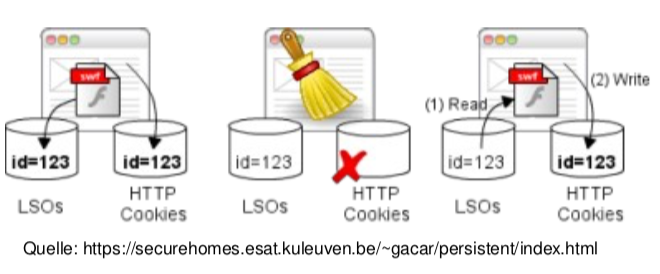
Evercookie
- Samy Kamkar (MySpace Worm)
- Multiple technologies setting the ID
- User only deletes browser cookies
- Cookie resists to be deleted
- e.g., localStorage, Flash Local Shared Objects, Silverlight Isolated Storage
HSTS Tracking
- HTTP Strict Transport Security
- Security feature of browser
- Controls connection behavior to server
- Server may submit
Strict-Transport-Security: max-age=Xheader - Client browser automatically redirects to HTTPS
- Idea:
- Encode ID using HSTS-Headers for each bit
- Tracking
- Generate unique, random user ID on client
- Let server set HSTS header for each bit number with a
1http://<bit-no>.attacker.com/set- e.g., ``http://24.att.com/set`
- Server sets HSTS header for this domain
- To read the ID, retrieve for all length-of-ID servers
- Retrieve HTTP (not HTTPS) response for each domain
- If HSTS was enabled, the server is connected via HTTPS
- e.g.,
http://<bit>.attacker.com/get - Return
id[<bit>] = 1if connection was created over HTTPS otherwiseid[<bit>] = 0 - Reconstruct user ID
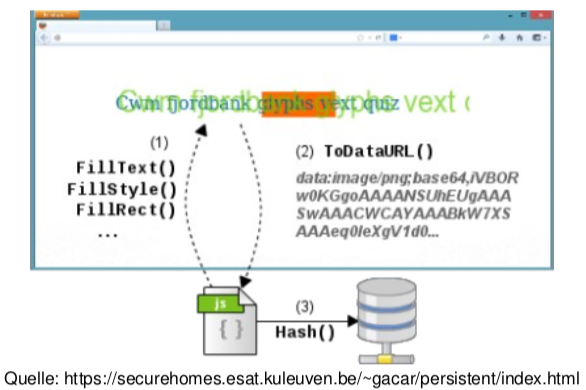
Canvas Fingerprinting
- see Same-Origin Policy > Perfect Pixel Timing Attack
- Every computer (i.e., hardware, browser, OS, drivers) renders text differently
- Idea:
- Measure rendering behavior
- 1 of 1000 users
- Attack:
- Print a lot of text in a canvas element
- Countermeasure:
- Disable JavaScript
- Plugins creating Noise in canvas
- Ineffective:
- Disable canvas (too specific)
- Change screen resolution (only generates a new ID)
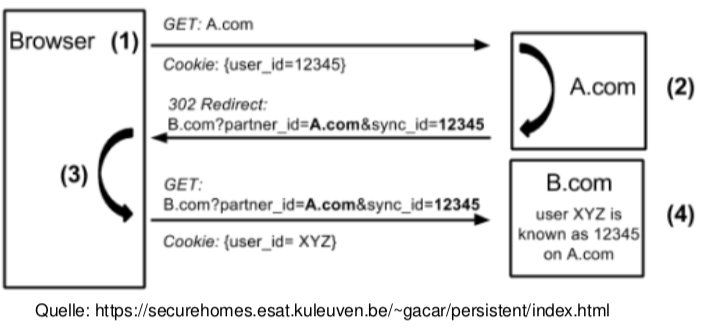
Cookie Syncing
- Multiple trackers sync their cookies
- User browses website A (first tracker)
- A redirects to B (second tracker) with user ID in GET
- B redirects back to A (sending the ID from B)
Preventions
Do not trackheader1: Opt-out (do not track)0: Opt-in (do track)
- Protection against cookies:
- Opting-out (still uses cookies)
- Incognito browsing (no cookies are stored)
- Extensions (Ghostery, Disconnect)
- Delete all cookies