Caching
- Goals:
- Web resources should be provided by a service
- Client should be able to update resource
- Access time should be small
- Scalability should be given
- Cache:
- A cache is a component which stores data transparently so that recurring requests have a faster response time
- Possible caching locations:
- Database (cache query results)
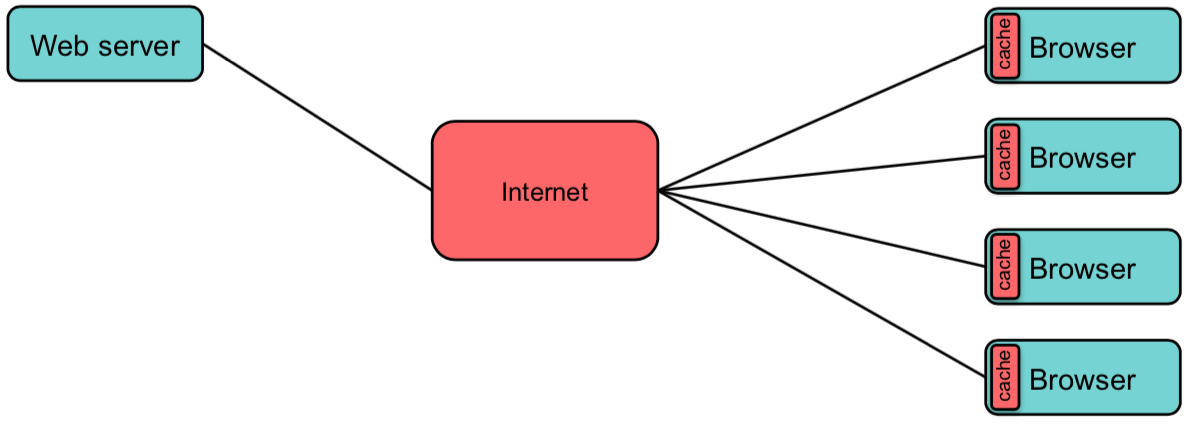
- Client-side (Browser)
- Server-side
- Intermediate (CDN, proxies)
Client-side (Browser)
- Server can send HTTP headers with caching directives for certain resources
- Scenario: Resources are equal
- Headers:
Cache-ControlETagLast-ModifiedIf-None-MatchIf-Modified-Since
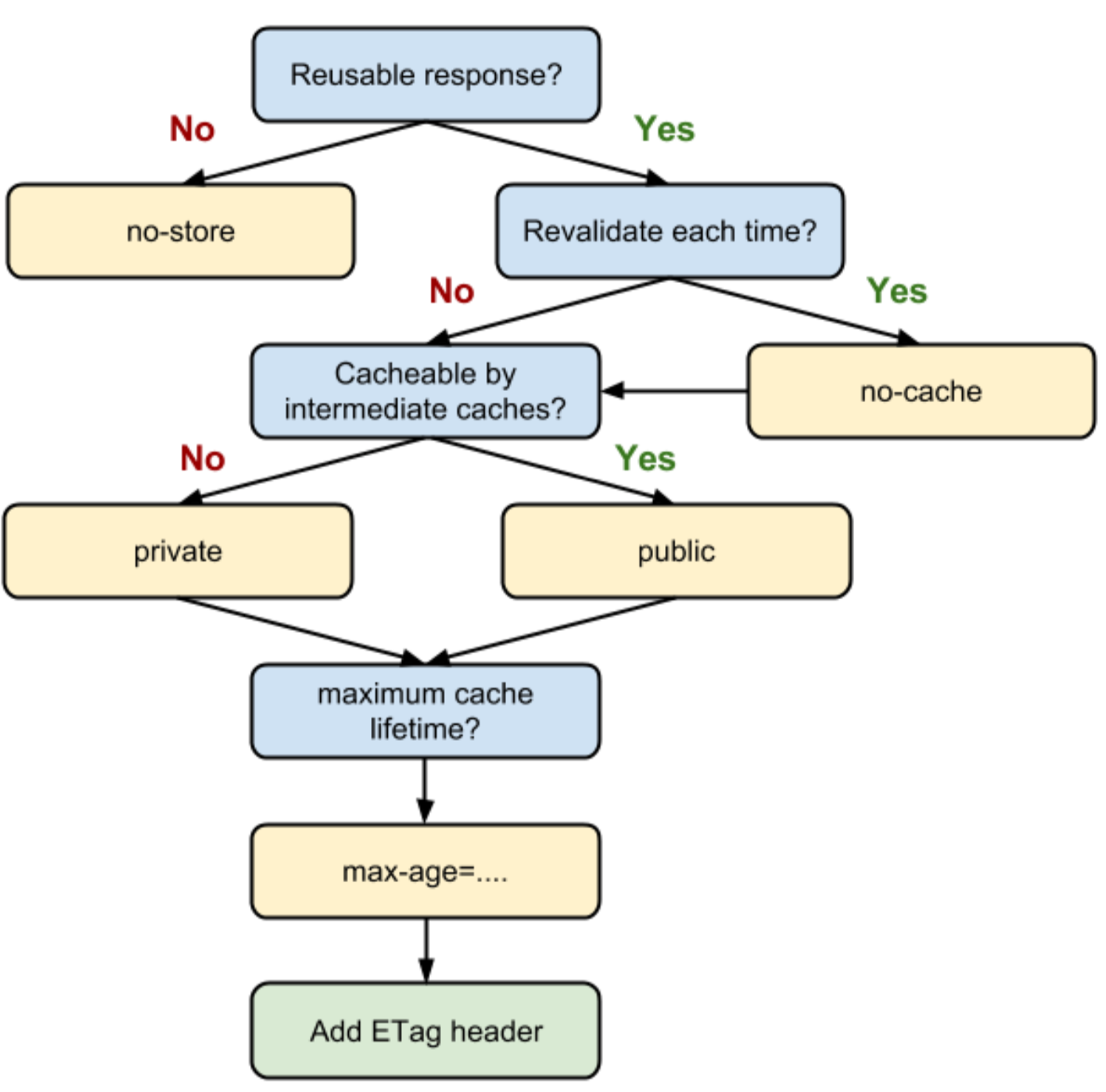
Header Cache-Control
- Several options may be combined
no-store:- Addresses the client and intermediate proxies
- Do not store data
- If copies exist, delete them
- Note: Browsers may keep file anyway to support a history navigation
- Use case: Annotate sensitive files (e.g., security relevant)
no-cache:- Addresses the browser and intermediate proxies
- Check, if the resource is up-to-date before delivering it
- i.e., force the caching component to validate the resource
private:- Browser: Caching is allowed (but not required)
- Proxies: Do not cache
public:- Everybody may cache the response
max-age=<seconds>:- Specify the time (in seconds) for which the resource is considered as up-to-date
- Time is relative to request time (in contrast to
expires)
must-revalidate- Cache component must check state of resource before delivering it
- Do not use expired resources
- ==Differente to no-cache?==
- Example:
- Prohibit caching:
Cache-control: no-cache, no-store, must-revalidate
- Cache static assets:
Cache-control: public, max-age=31536000
- Prohibit caching:
Header ETag
- Purpose:
- Provide an unique identifier for a version of a resource
- Response header
- ETag is delivered with the resource
- Each new version gets a new E-Tag
- e.g.,
ETag: "<etag_value>"
Header If-None-Match
- Purpose:
- Server checks if the resource is up-to-date
- Only deliver the resource if it changed
- Request header (usually,
GETorHEAD) - Values:
If-None-Match: "<etag_value>"If-None-Match: "<etag_value>", "<etag_value>", ...If-None-Match: *
- Behavior:
- Server sends the resource if and only if the ETag of the resource is not contained in the list of ETags from the header
- Otherwise:
GET/HEAD: return 304 Not ModifiedPOST/PUT: return 412 Precondition Failed
- Opposite header:
If-Match - Similar headers:
If-Modified-SinceLast-Modified
 .
.
Server-side
- Scenario: HTTP responses are similar/modified rarely
- View elements
- e.g., Header, Footer, Sidebar, Lists
- Rarely modified Data objects
- e.g., Access rights, configuration parameters, product data
- Expensive/large data
- e.g., contact lists, diffs on GitHub
- View elements
- Access Time:
- Main memory (RAM, \( 100 \mu s \))
- Local filesystem
- SSD \( 100 \mu s \)
- HDD \( 1000 \mu s \))
- Remove server (additional \( 100 \mu s \))
- Rule of thumb: RAM > SSD > Remote server
- Hit rate:
- RAM: Only processes of the application can access data
- SSD: All processes of server can access data
- Remote: All nodes of the cluster can access data
- Important: Trade-off between Access time and Hit rate
- Example: Memcached
- Memcached is a cache program
- i.e., it manages data in the RAM
- Features:
- TCP interface
- Distributed
- Key-value store
- Key size: 250 Byte
- Value size: 1 MB
- Strategy: Least Recently Used (LRU)
- Access time in \( O(1) \)
Content Delivery Network
- Motivation:
- A single host providing popular data has problems:
- Scalability
- Reliability
- Performance
- Problem: Instant popularity of a resource (so-called flash crowd)
- A single host providing popular data has problems:
- Idea:
- Use servers which are close to the user to distribute static content
- i.e., at the edge of the network
- Goals:
- Reduce the number of accesses to the primary server
- Increase the response time for the users
- e.g., cache images, videos, CSS (static files)
Approaches
No CDN
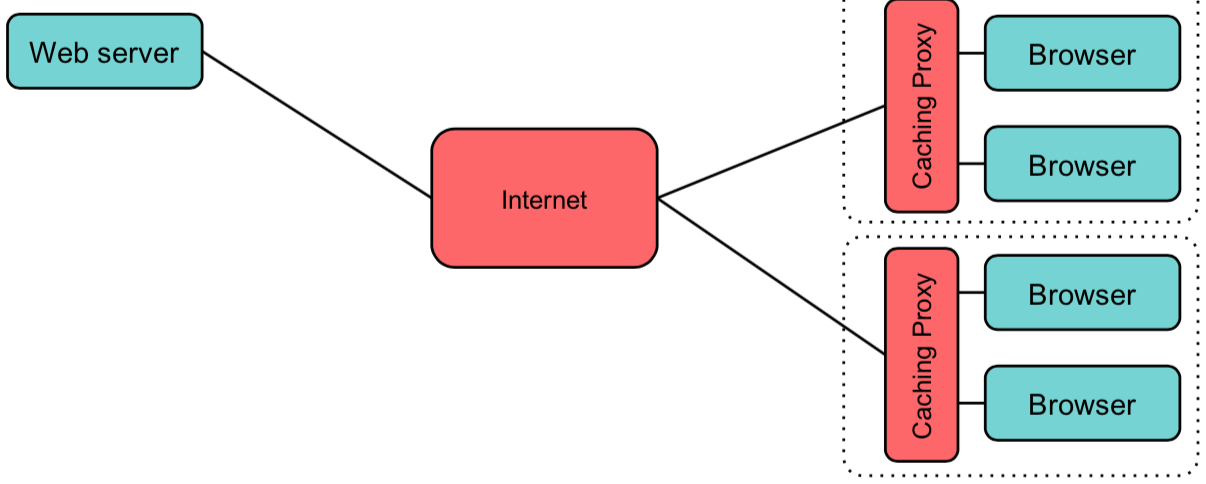
Proxy Server
- Caching on client-side
- e.g., cache server per institution
- Disadvantage:
- Cache control is outside of provider (may affect hit rate)
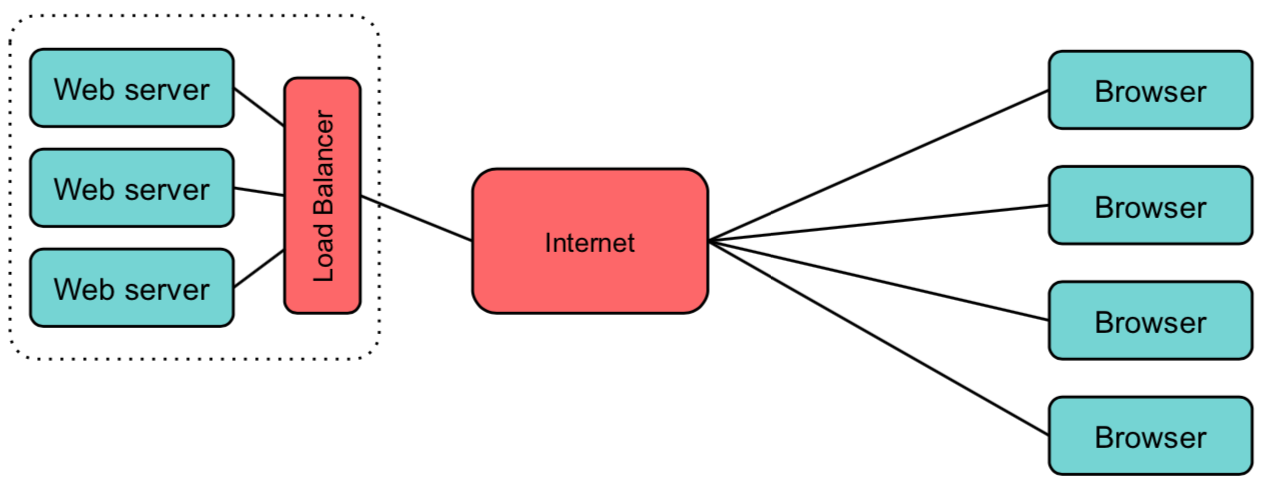
Load Balancing on Server-Side
- Increase scalability on server-side using a load balancer
- Advantage:
- Scalability
- Disadvantage:
- Bottleneck on Load Balancer possible (e.g., network bandwidth)
- Latency between server and client too high
- Cluster may fail
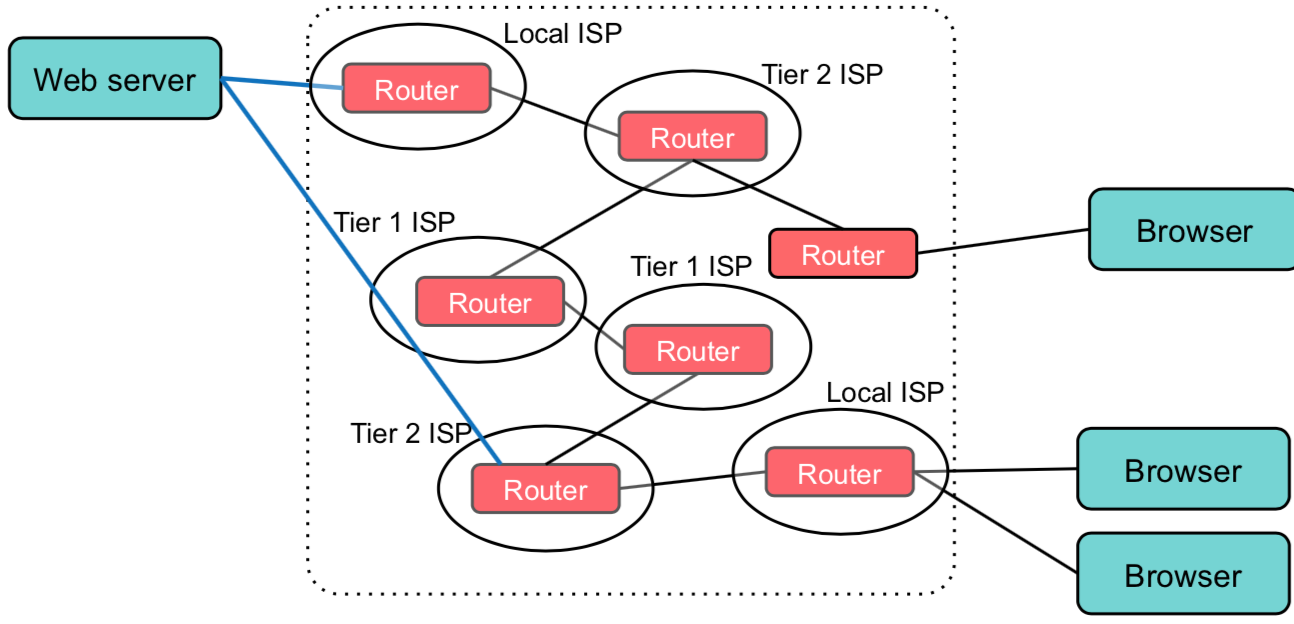
Multi-Homing
- Server establishes connections to multiple ISPs
- Server has a single IP
- But multiple links to different ISPs
- Border Gateway Protocol distributes address
- Clients may take different routes to the server
- Advantage:
- Tolerate ISP failures
- Disadvantage:
- Re-routing takes time
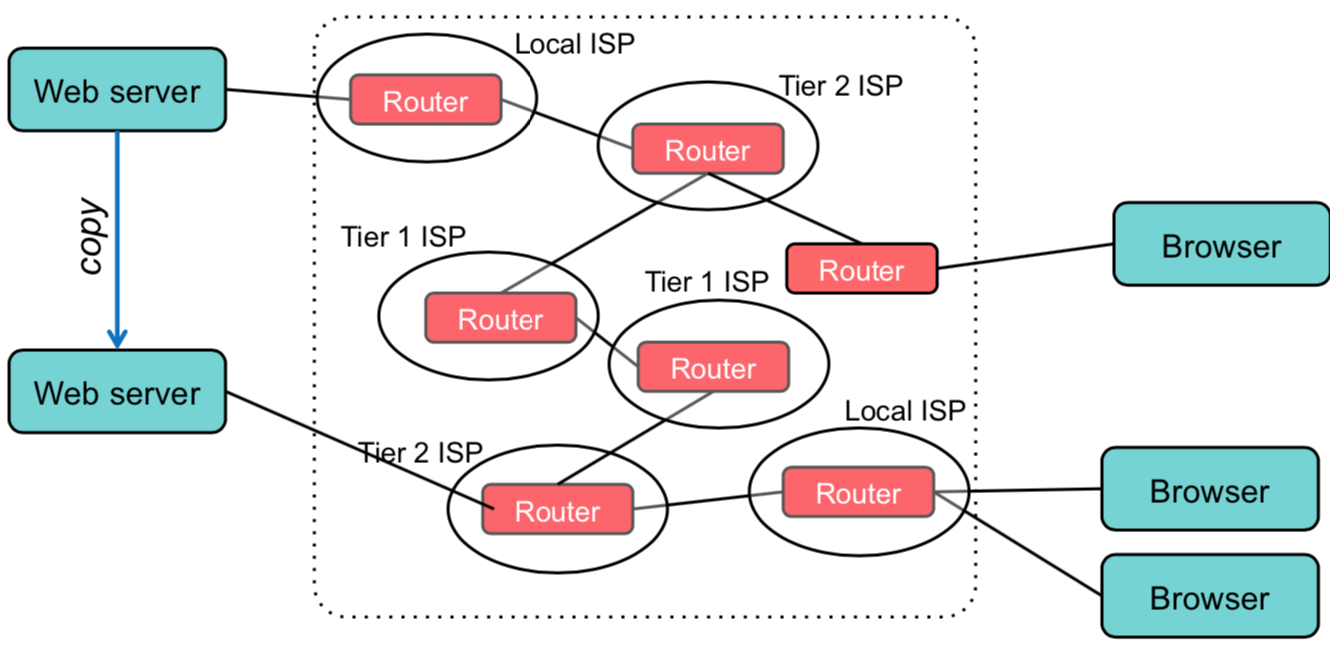
Mirroring / Replication
- Synchronize multiple servers (containing the same static files)
- Use the ISPs as Load Balancer
- Advantage:
- Fault-tolerant for ISPs and servers
- Disadvantage:
- Synchronization is not trivial
Akamai
- Akamai:
- Content Delivery Network
- Based on MIT research
- Facts of the company:
- 240 000+ servers
- 1 600+ networks
- 130+ countries
- 15-30% of Web files are distributed
- 30 Tbps cumulated bandwidth
- Goal:
- Counter problem of the flash crowd
- Provide data by servers having a low latency, being non-overloaded and which contain the data
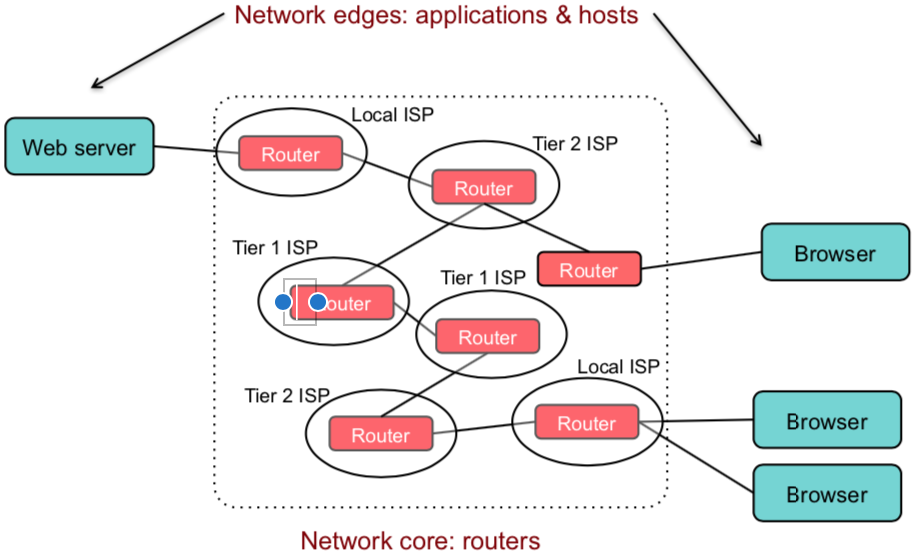
- Note: Internet structure
- Internet is composed of many autonome systems (AS)
- ISPs are interested in:
- Fast connection between user and network (last mile)
- Fast connection of servers inside their network
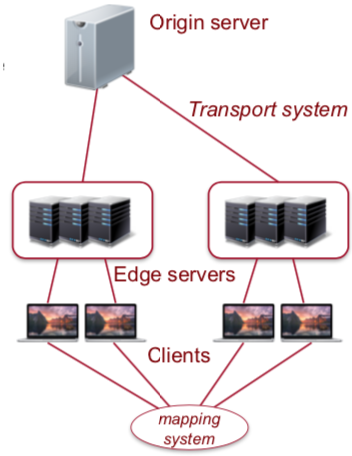
- Architecture:
- Provide an overlay-network
- Cluster of cache servers which are distributed over many ISPs
- Cache servers are fully-meshed
- Workflow:
- Client wants to load a static file (
akamai.org/...) - Name resolution:
- Akamai uses own DNS servers
- DNS server selects the nearest edge server
- Receive monitoring information:
- Request origin
- Availability and load of servers
- Network topology (BGB, traceroute)
- Usually, an edge server in ISP range of the client is preferred
- Routing
- Client connects to the edge server
- Either, the edge server has the requests resource
- Otherwise, connect to the original server
- Client wants to load a static file (
- Advantages:
- Data is locally stored
- Dynamic content is still on original server
- Maybe, use a hierarchy of cache servers (i.e., parent and edge)
- Routing (multiple different routes)
- Security
- High capacity (robust, e.g., DDoS)
- Use monitoring to detect attacks
- Protects the original services (shield)
- Types of resources:
- Static content (very long)
- Dynamic content possible
- i.e., Edge Side Include (markup language for CDNs to dynamically generate content)
- Streaming (internal distribution)
 .
.