Client-side Technology
Motivation
- Historically, only static HTML pages with forms existed
- An Application was implemented by the Common Gateway Interface (CGI)
- Common Gateway Interface:
- i.e., 0th generation of frameworks
- URLs link to binary files executed by the server
- Environment variables and GET parameters are passed to the binary
- Output is written to
stdoutand read by the Webserver
- State-less implementation (good scalability)
- Language: Usually Perl
- Disadvantage:
- Start process on every request (resource intensive)
Frameworks for Web Applications
1st Generation (Templates)
- Integrate the interpreter of the programming language in the Webserver
- Use Templates:
- Mix of code and HTML
- e.g., PHP, ASP.net, Java Servlet
- Libraries:
- URL parsing
- Support of HTML generation
- Session management
- Database access
- e.g., PHP, ASP.net (Active Server Page), Java Servlet
2nd Generation (MVC)
- Model-View-Controller (MVC) architectural pattern (see below)
- Goal:
- Decompose Web applications
- Apply architectural pattern to Web applications
- Handle dynamic data
- Map objects to database
- e.g., Ruby on Rails, Django
3rd Generation (JS)
- JS-based frameworks executed in the browser
- Goals:
- More application character
- Interactive, responsive applications
- Less requirements for the server-side
- Node.js, NoSQL database
- Uses concepts of the MVC architeture and Templating
- e.g., AngularJS, ReactJS
Model-View-Controller
- Architectural pattern to separate logics, visualization and storage
- Used in many frameworks
- Currently, applications consist of components which are structured in the MVC pattern
- Components:
- Model: Manages application data
- View: Presentation of website (e.g., HTML/CSS)
- Controller: Application logic
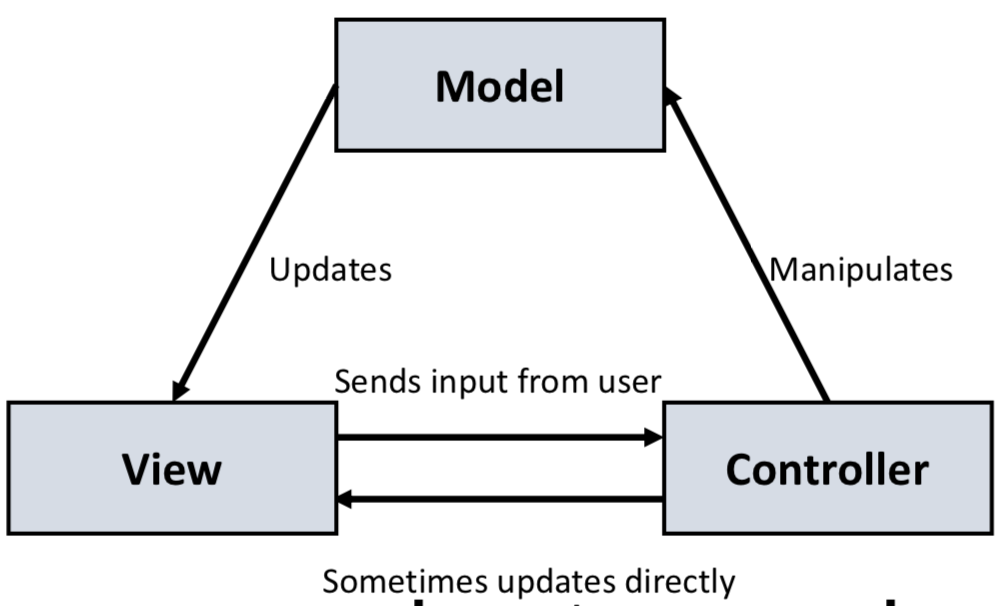
Model
- Manages application data (e.g., database, JS objects)
- Provide non-static data (which are required by view and controller)
- Are related/dependent on the database schema
- Often, an Object Relational Mapper (ORM) is used
- Database scheme is influenced by the Web application
- Possible conflict:
- Database scheme and application model
- e.g., applications are more dynamic and require more flexibility
View
- Finally, Application must provide HTML/CSS page
- Usually, use templates
- Template:
- Partial document
- Pre-defined document with placeholders for dynamic content (inserted by Web server/application)
- Advantages:
- HTML structure is preserved
- Good estimation about the amount of dynamic content
- May be rendered by server or by client
Controller
- Responsibility:
- Connect model and views
- e.g., communication with the server, transfer of data (create, update, …)
- Manages the displayed/rendered templates
- React to user events (e.g., scripts, DOM events, interaction with server)
- 2nd generation framework: Controller on server-side
- 3rd generation framework: Controller executed inside the browser
Example: Django
- Python MVC framework
- Also called MTV framework because the naming is different
- Model: Model
- Template: View
- View: Controller
Single Page Applications
- Single Page Application:
- Web application reacting dynamically to user input without reloading the HTML
- Advantage:
- Less communication
- Better response time
- Problem: User navigation kills application state
- Formerly, different sites had different URLs
- User uses browser navigation features:
- Menu bar of the browser
- History next/back
- Bookmarks
- Reloading a page
- Exchange of URLs between users
- Solution:
- Replace the native navigation behavior of the browser to keep the application state
- Approaches:
- JS Warning:
- Warning if users leaves website
- Deep Linking (with History API)
- JS Warning:
Deep Linking
- Goal:
- URL should contain the context of an application (to recreate the state)
- Question: What belongs to the state?
- Defined by the developer
- What about popup windows?
- Does the state depend on the user’s browser (e.g., link sharing)?
- What about navigation (e.g., reloading?)
- Approaches:
- Link is updated dynamically
- Good for reloading/bookmarking
- Bad for sharing the link
- Actively create a deep link
- URL in address bar looks well
- Link is updated dynamically
- Navigation inside the application:
- Location API
- Router
- Browser behavior
- History API
Location API
- Accessible using
window.location- Manipulate the URL
- Parts:
protocol, hostname, pathname, search, hashpathname: Path componentsearch/hash: Additional information like query terms and fragment
Router
- Usually, SPAs and frameworks have a routing component
- Map an URL to a function/controller
- e.g., Observer pattern
Browser Behavior
- Usually, link clicks are handled by the browser
- Can be prevented with
e.preventDefault() - e.g., form submit (handle submission by JS)
History API
- Purpose:
- Record the history of the browser (
window.history)
- Record the history of the browser (
- Idea:
- Usually, web site is re-rendered (create a new
documentinstance) - Instead, update the
documentinstance
- Usually, web site is re-rendered (create a new
- Functions:
go([delta]):- Navigate
deltasteps forward - Fires a popstate event containing the state of the history entry (register at this event)
- Navigate
pushState(state, title, url):- Create an entry in the history without reloading the site
state: Serializable JS-object (max. 640 KB)title: Currently ignored by the browsersurl: URL (absolute/relative) for the entry (SOP)- After the call, older entries are lost
replaceState(state, title, url):- Replace an entry without reloading the site
- Within the domain (SOP)
- see above
- Goal:
- Prevent the native behavior of links (
preventDefault()) - Use
pushState()andreplaceState()
- Prevent the native behavior of links (
- Exceptions:
- Click with hold functional keys