WebAssembly
Motivation
- Web applications become more complex
- e.g., audio, video, 3D objects, games
- Problem with JavaScript:
- Slow execution time compared to native code
- But: No real alternative exists
- Performance improved by Just-In-Time compiling (only works sometimes)
- Alternative languages failed (e.g., ActiveX, Flash, Java)
- Current trend:
- Transform other languages to JS
- Use languages with better concepts
- e.g., TypeScript having type safety
- Use languages with better performance
- e.g., C++ code is transpiled to
asm.js asm.jsa faster subset of JS (foundation for WebAssembly)
- e.g., C++ code is transpiled to
- References: WASM concepts
Basics
- WebAssembly (WASM) is a byte-code format
- Secure
- Rapidly executable (performance)
- Portable
- Security:
- In other languages security is achieved by the interpreter/runtime environment
- Low-level code can not be secured that easy
- Performance
- WASM is ahead-of-time compiled
- Performance of ahead-of-time compiled code is better than interpreted code
- Format must be compact for fast loading
- Portable
- Important property for web technology
- Requires that the format is hardware- and platform-independent
- Summary
- Supported by many browsers
- No multithreading
Technical Realization
- Technical:
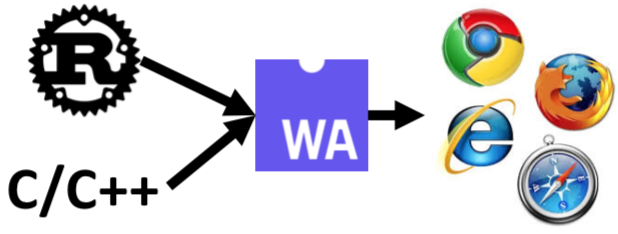
- WASM realizes a virtual Instruction Set Architecture (ISA)
- ISA can be target of different programming languages
- e.g., compile C++/Rust to WASM
- Requires languages with static memory management
- WASM vs. JavaScript:
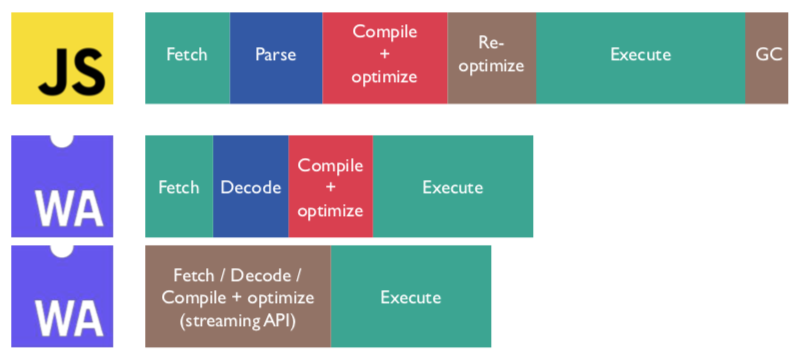
- WASM is loaded faster
- WASM is executed faster
- Code format:
- Low-level byte-code format
- Has a binary and textual representation (equal)
- Supporting 32-bit/64-bit integers (i32, i64)
- Supporting floating point numbers (f32, f64)
Concepts
- Module:
- Compiled binary program
- Stateless
- Can be shared with Web Workers
- A Program is called module
- Memory:
- Provides an ArrayBuffer (variable length)
- Represents the memory section of the program
- Table:
- Array with variable size for references
- These could not otherwise be stored in the memory segment (portability or security reasons)
- Instance:
- Instance of a module paired with a memory and a table
- Stateful and resolved imports
- Comparable to ES2015 module
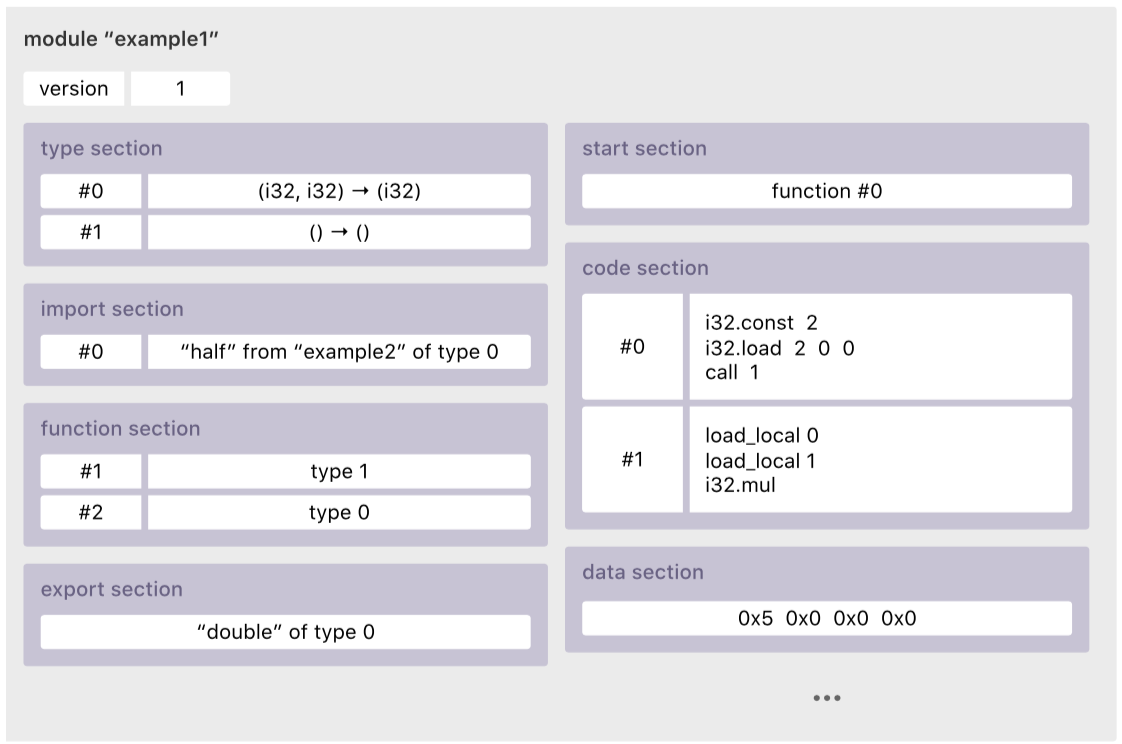
Module Sections (Anatomy)
- Type
- Function signature declaration
- Contains all functions declarations of the module
- Example:
(i32 i32 -> i32) // func_type #0(i64 -> i64) // func_type #1
- Import
- Import declarations
- Lists external dependencies (module name, field name and type)
- Browser resolves the dependencies
- Enable dynamic linking
- Enable the embedding of other modules and the use of extern functions
- Example:
("dumb-math", "quadruple", (func_type 1)) // func #0
- Function
- Function declarations
- Define an index of functions implemented by the code segment
- Call functions by their index (
func #N) - Example:
(func_type 1) // func #1
- Table
- Indirect function table
- Contains one or more tables
- Tables contain elements which are not directly accessible by WASM (e.g., JS objects, file descriptors)
- Connect the low-level un-trustable linear memory and the higher-level language functions and references
- Memory
- Memory attributes
- Allocate additional/optional memory for the module
- Requires initial and maximal size
- Global
- Global declarations
- Declare all global variables (cf.,
staticfrom C++)
- Export
- Exports
- Define all extern accessible elements
- e.g.,
("half" (func 1))- “half” can be combined to
function half(arg0:int64):int64using the function and the type section
- “half” can be combined to
- This can be functions, tables, memory segments and global variables
- Start
- Start function declaration
- Define a main()-function
- Function is called if the module is loaded
- Element
- Elements section
- Initialize the previously imported or previously defined tables
- Code
- Function bodies
- Contains code of all functions
- Functions are provided by the order in the index (function section)
- WASM represents an abstract stack-machine
- Additional operations:
div,add,eqz(check if zero)
- Data
- Data segments
- Set imported and locally defined memory regions
- e.g., reserve 4 bytes for an i32 value
Operations
Translation and Execution
- Translation (
emscripten):- Clang/LLVM compiler takes C++ files
- Clang/LLVM generates a intermediate representation
- Emscripten converts intermediate representation to a
.wasmfile (module)
- Execution:
- Problem: WASM can not access the DOM
- Only call JS functions exchanging integers and floats
- Glue code: Emscripten provides helper functions (enable connection between WASM and browser API)
- Emscripten helper functions:
- Provides popular C++ libraries
- e.g., SDL, OpenGL, OpenAL, POSIX
- Must be connected to Web API of the browser
- Must be provides on loading the module
- e.g., redirect stdout to a textarea
- Using JS it is possible to generate WASM modules (using the plain text format)
- Example:
emcc hello.c -s WASM=1 -o hello.html-s WASM=1: Create WASM code-o hello.html: Create template with helper functions- Result:
hello.{wasm,js,html}

Calling Functions
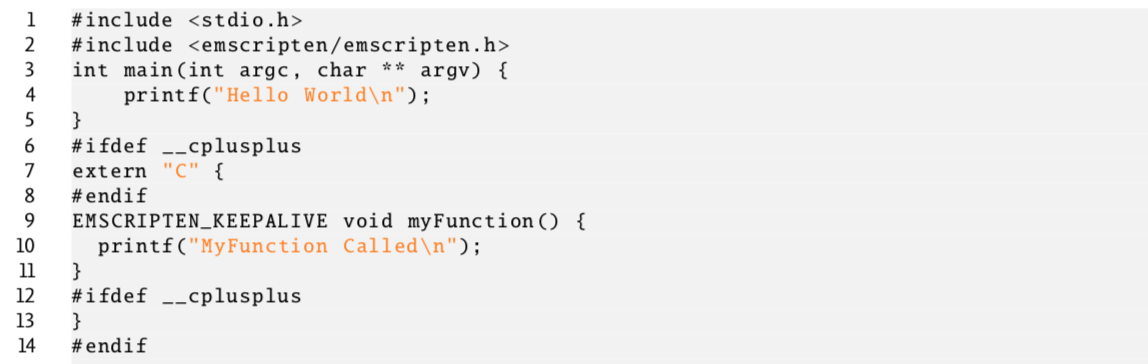
- To use a WASM function in JavaScript, mark the function using
EMSCRIPTEN_KEEPALIVE - To keep the module running after calling the main() function, compile with
NO_EXIT_RUNTIME=1 - Calling function from JavaScript:
Module.ccall('myFunc', null, null, null);- 1st argument: Name of function
- 2nd argument: Return type
- 3rd argument: Argument types
- 4th argument: arguments
Importing Functions
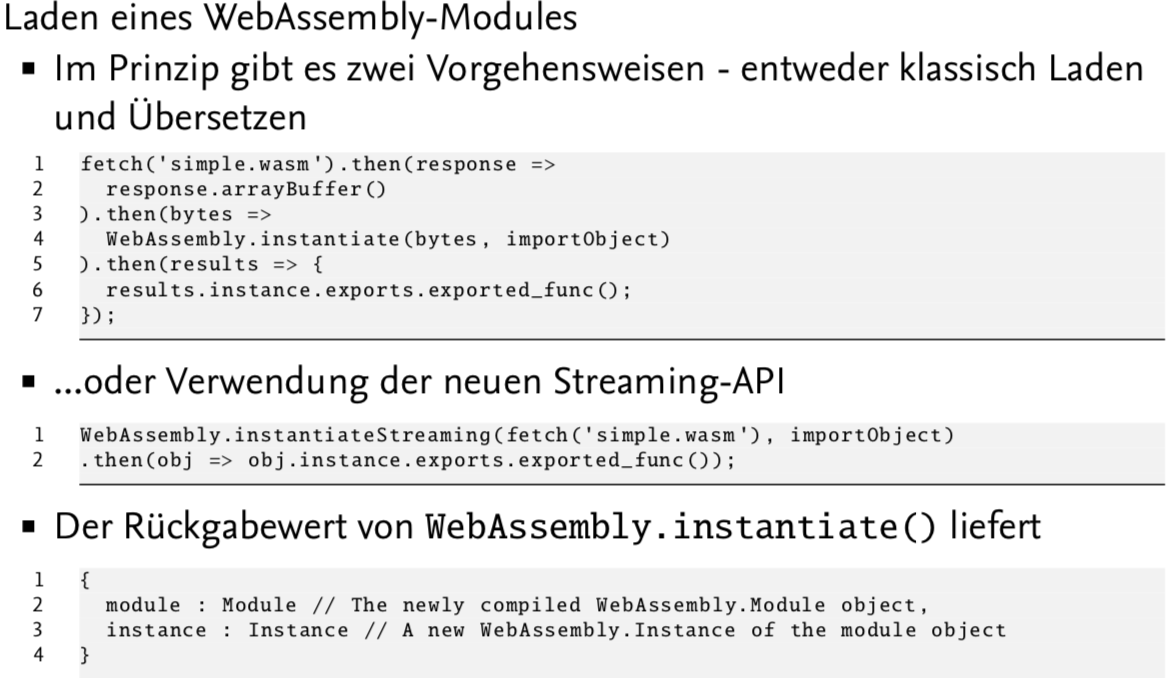
- Situation: WASM code imports a function I
- Script must function I to JS function
Using Memory
- Each module has its own memory region (address starts at 0)
- Goal: Isolation between instances
- JavaScript perspective:
- WASM module memory is ArrayBuffer with variable length
- Memory can also be creating using JS
var m = new WebAssembly.Memory({initial: 10, maximum: 100})- Allocate multiple of 64 KB
- Access:
- Getter/setter
new Uint32Array(memory.buffer)[0] = 42
- Increase memory:
memory.grow(bytes)- Until the maximum size (then,
WebAssembly.RangeError)
- Memory can be accessed from both sides:
- Advantages:
- Initialize memory while module is loaded (save time)
- Use memory in multiple instances (realize dynamic linking)
- Advantages:
Using Tables
- Tables are the only way to call functions
- Tables can be accessed/edited/resized by JS
- Functionality is required for dynamic linking
Caching
- Problem:
- Complex applications have a lot code which must be compiled
- Idea: Store the compiled modules in an IndexedDB
- Use versioning to get correct version