Web Technology
URI
- Uniform Resource Identifier
- Goals:
- Unique identification of resources
- e.g., documents, mails, websites, inboxes
- Uniform schema for referencing
- Extendible format
- Human-readable format
- Machine-readable format
- Unique identification of resources
- Contemporary view: Everything is a URI with different schema
- Format:
<schema> "://" [ <user> [ ":" <password> ] "@" ] <host> [ ":" <port> ] [ "/" <url>]- e.g.,
http://john@bitbucket.de:9000/home
HTTP
- Development Goals of HTTP 0.9
- Easy Request-Response-based communication
- Unique identification of resources (each HTTP request contains an URI)
- Stateless protocol
- Metadata for communication (headers, status codes)
- Further developments
- HTTP is standardized by the W3C and the IETF
- Most prominent version is HTTP 1.1
- Newest version is HTTP/2
- Versions
- 1991: HTTP 0.9
- 1991-1995: HTTP 1.0
- 1995-2014: HTTP 1.1
- 2014: HTTP/2
- HTTP 0.9/1.0/1.1
- Text-based protocol (easy processing)
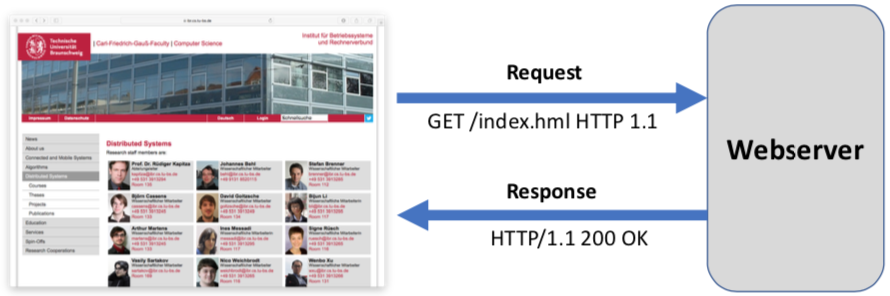
- Request-Response-interaction
- Client sends request
- Server sends response
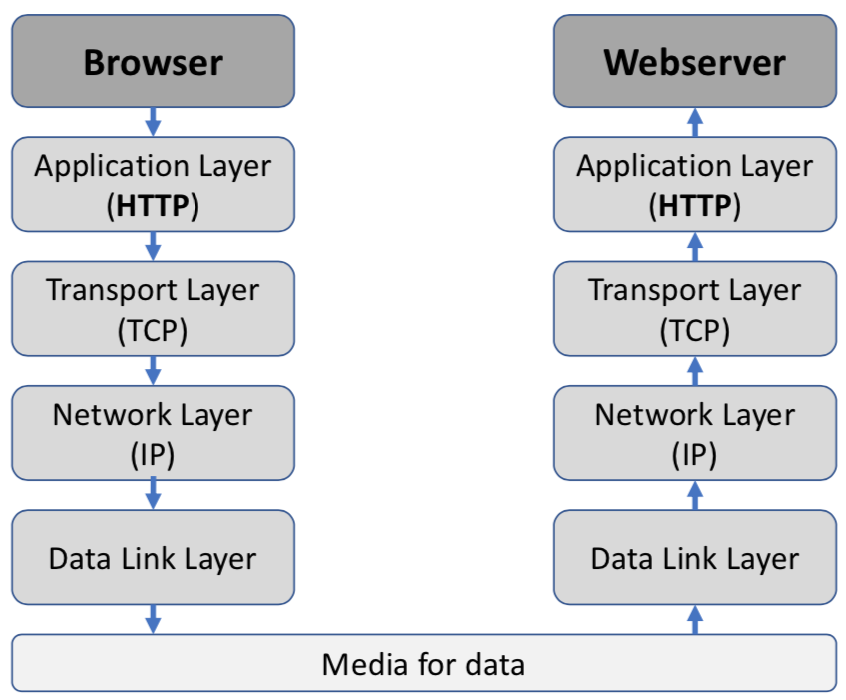
- Protocol stack:
- HTTP: Protocol of the application layer
- Thus, it requires a transport protocol (usually TCP)
HTTP Message
Request
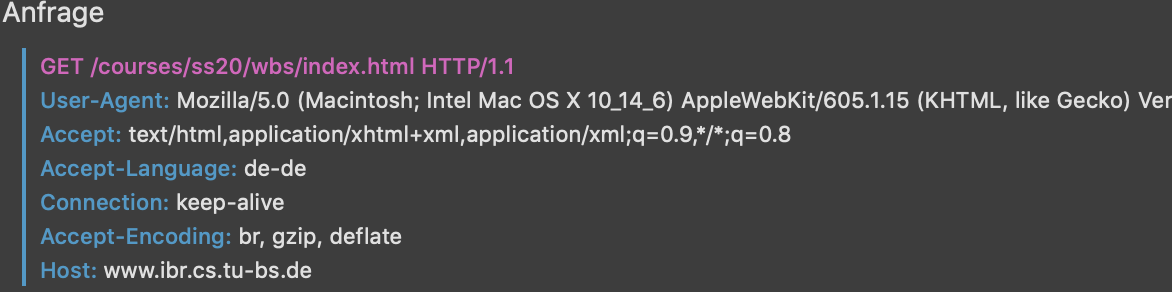
- Structure:
- Method type
- e.g.,
GET /robots.txt HTTP/1.0
- e.g.,
- Request header
- Additional information for the request
- e.g.,
User-Agent: Mozilla/5.0 - e.g.,
Host: www.fau.de
- Empty line
- Optional Payload (body)
- Content
- Described by different headers (e.g.,
Content-Type, MIME-Type)
- Method type
- Methods:
GET: Simple data request (identified by an URI)POST: Send data- State-changing operation
- Data stored on the body
HEAD: Like GET, only send response header- e.g., error detection
PUT: Save data (create resource if it not exists)DELETE: Delete a resourceOPTIONS: Request information about server (e.g., supported methods)
Response
- Structure
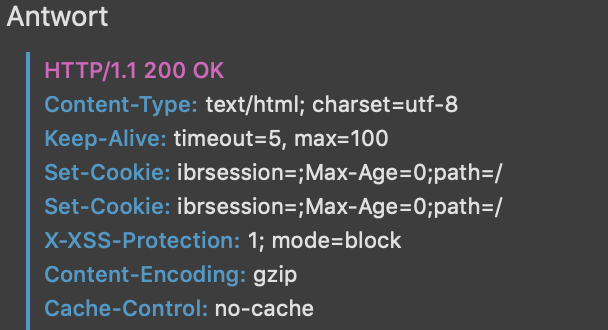
- State
- e.g., ´HTTP/1.0 200 OK`
- Response header
- e.g.,
Set-Cookie: foo=bar - e.g.,
Server: Apache/2.0
- e.g.,
- Empty line
- Optional body
- State
- Data
- May be arbitrary (given by Content-Type-Header)
- e.g.,
Content-Type: text/html
- e.g.,
- Multiple parts:
multipart/mixed
- May be arbitrary (given by Content-Type-Header)
- Status Code
- 1xx: Informational response
102 Processing
- 2xx: Success
200 OK
- 3xx: Redirection (regard
Locationheader)301 Moved Permanently
- 4xx: Client errors
400 Bad request404 Not found
- 5xx: Server errors
500 Internal Server Error501 Not Implemented
- 1xx: Informational response
TCP/IP Connections
- HTTP 0.9/1.0:
- One TCP/IP connection per request-response-pair
- Servers are completely stateless
- Problem: Repeating establishment of a new connection is expensive
- TCP three-way-handshake
- TCP slow-start (start transmission with few packets)
- Requires system resources (network, etc.)
- Enhancements:
- Re-usable connection (HTTP 1.0)
- Multiple requests use the same connection
Connection: Keep-Aliveheader- Default in HTTP 1.1
- HTTP Pipelining (HTTP 1.1)
- Multiple requests after another (without waiting for the response)
- Responses come in the same order
- Problem: Head-of-Line Blocking
- If one requests is blocked, all others are blocked too
- Thus, use multiple TCP connections (2-8)
- Re-usable connection (HTTP 1.0)
- HTTP/2
- Binary framing layer with one TCP connection per origin
- ==Where does this info come from?==
HTTPS
- Not: Secure-HTTP (S-HTTP)
- Security concerns of HTTP:
- Confidentiality: Communication is plain text
- Integrity: Sent data can be manipulated
- Authentication: Credentials are transferred un-encrypted
- HTTP Secure:
- HTTPS: Build HTTP on top of TCP using TLS
- Default port: 443
- Scheme:
https - Messages are completely encrypted
- TLS is used to select encryption ciphers and keys
- Workflow connection
- Setup:
- Browser contains a list of root CAs
- Server has a certificate (indirecly) signed by one of these CAs
- Browser sends supported ciphers to server
- Server sends certificate (X.509) to browser
- Browser checks the certificate validity and finishes the establishment of the connection
- Setup:

HTTP/2
- Goals:
- Reduce latency (by full request-response-multiplexing)
- Minimize protocol overhead (by efficient compression)
- Keep semantics of HTTP 1.1 (prevent rewriting applications)
- Solve problems of HTTP 1.1
- Fix sensitivity against variable Round-Trip-Time ==What does that mean?==
- Fix Head-of-line blocking
- Avoid parallel TCP connections
- History:
- 2009: Start of development at Google
- Research network SPDY
- Goal: Reduce loading time of websites by 50 %
- 2012: Chrome, Firefox and Opera support the protocol
- IETF HTTP WG initiate standardization process
- 2015: Publication of HTTP/2 and HPACK
- 2009: Start of development at Google
- Overview:
- Core concept: Binary-framing layer
- Framing is another word for formatting
- Multiplexing: One TCP connection for the complete communication with one web server
- Stream Prioritization (each request is encapsulated in a stream)
- Flow control
- Server push (pro-active sending of resources)
- Header compression: HPACK
- Core concept: Binary-framing layer
- Three options for establishing of connections:
- Default: Initiate connection with TLS connection over ALPN (Application-Layer Protocol Negotiation)
- Upgrade of HTTP/1.x connection (
HTTP upgrade) - Pro-active creation of HTTP/2 connection using pre-shared knowledge (e.g., DNS entry)
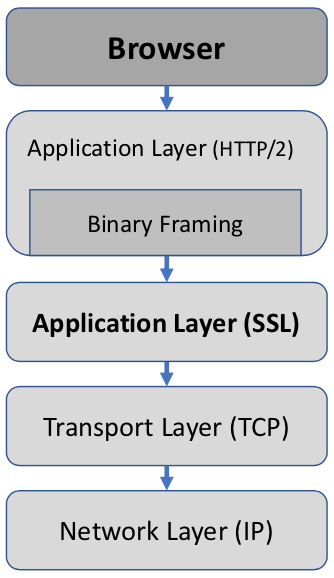
Binary Framing Layer
- Task: Transmission of HTTP messages between client and server
- Layer:
- New encoding mechanism between socket and higher HTTP API
- Transparent to application (only change browser and web server)
- Split HTTP messages into frames
- Frame: Small binary parts
- Advantage: Performant, robust, correct implementation
- Disadvantage: Human-readability gets lost
- Binary Framing Layer concepts:
- Request-Response-Multiplexing
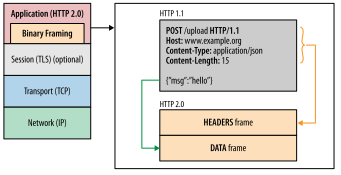
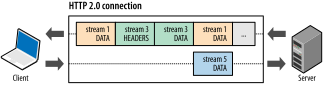
HTTP/2 Connection
- Communication: Performed over a single TCP connection carrying any number of streams
- Stream:
- Bi-directional communication for one or more messages
- Has unique ID
- Message: Complete sequence of frames composing a HTTP request or response
- Frame:
- Smallest logical unit for data transmission
- Contains a reference to the stream in the frame header
- e.g., HTTP headers, payload, …
- Frames may interleave each other
- Advantage:
- Improved performance (fewer TLS handshakes, less client/server resources)
- Disadvantage:
- Single TCP connection may suffer of TCP congestion window size reduction which reduces the maximum throughput
- Result:
- Experimental evidence shows, that HTTP prioritization and compress out-weight the negative effects of TCP head-of-line blocking

Multiplexing
- HTTP/1.x:
- Parallel requests require multiple connections
- So-called Response queuing results in head-of-line blocking
- HTTP/2:
- Parallel requests over one connection
- Split HTTP messages, interleave them, reassemble them
- Advantage: No blocking of messages – if one message is blocked the others can be sent
- HTTP/1.x optimizations are obsolete
- e.g., image sprites: Single image file with multiple images
- e.g., concatenating files: one big CSS file
Stream Prioritization
- Goal:
- Organize/order sent data in a way that the website can be rendered as fast as possible
- Worst case: For all responses the headers are sent first, etc.
- Stream Prioritization:
- Browser may give hints which content is required at which time
- These hints may change dynamically
- e.g., HTML is required first, then CSS, then images
- e.g., take mouse movements into account
- Weights and dependencies are a preference
- Technical realization:
- Each Stream gets a weight/priority (1 to 256)
- The higher the weight, the more resources for this stream should be allocated
- Each stream may have an dependency on another stream
- Browser can send a prioritization tree for the responses
- Server can use this information
- No dependency means depend on root
- These dependency trees are traversed
- Note: The arrow should be flipped for better understanding of the dependsOn-relationship
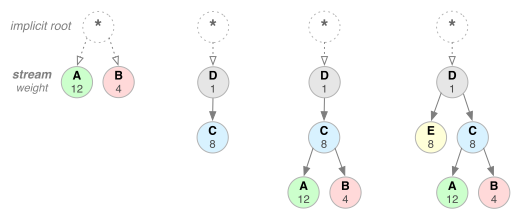
Flow Control
- Flow Control:
- Mechanism to prevent that the sender overwhelms the receiver with undesired data
- e.g., Client wants to pause that the servers sends of data in a single stream
- Comparable to TCP flow control
- TCP flow control:
- Is too coarse
- Limits complete connection, but HTTP/2 has multiple streams over a single connection
- Technical realization:
- Flow control can’t be disabled
- Client and server exchange a
SETTINGSframe, which contains the flow control window size for both directions (default \( 65535 \) Byte) - The window is reduced if the sender emits a
DATAframe - The window can be increased using a
WINDOW_UPDATEframe
- Implementation must be done by client and server
- e.g., the time of reducing the window
- HTTP/2 only delivers building blocks
Server Push
- Use case:
- Client requests HTML page including CSS files
- Server directly sends CSS files to prevent the client of requesting each file individually
- One request – multiple responses
- Goal: Make information available before the browser requests them
- HTTP/1.x Inlining is obsolete
- e.g., put style sheet directly into HTML page
- Difference to inlining: Each resource may be multiplexed/cached/declined/reused
- HTTP/1.x Inlining is obsolete
- Advantage: Reduce latency by reducing messages
- Technical realization
- Server sends a
PUSH_PROMISEframe to indicate that a push will follow - Server sends
PUSH_PROMISEbefore the actualDATAframe to inform the client (very important) - Server initiates new stream for the push
- Browser may decline
PUSH_PROMISEframe viaRST_STREAM - Browser keeps pushed data in quarantine until he uses it
- Server sends a
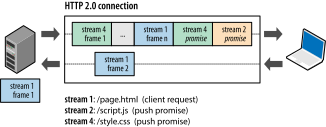
Header Compression
- Problem:
- HTTP headers make up to 500-800 Byte per message
- For small responses, headers are overhead
- Idea: Compress headers
- Using HPACK compression format
- Do not re-send common headres
- Technical realization:
- Techniques:
- Header fields are Huffman encoded (e.g., string compression method based on the entropy)
- Shared index/cache/context: Sent headers are not sent again (client and server must maintain this index)
- HPACK compression context:
- Consists of static and dynamic tables
- Static table:
- Common HTTP header values
- Defined by the specification
- e.g.
:method: GET
- Dynamic table:
- Contains headers which are not defined in the specification and is build over the connection lifecycle
- Initially empty
- One per (TCP-)connection
- Techniques:
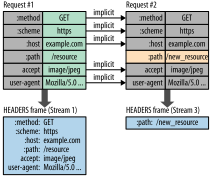 .
.
HTML and CSS
- Browser visualizes documents written in HTML
- Markup language:
- Machine-readable language for structure and rendering
- e.g.,
<title>WBS lecture</title>
- HTML:
- HyperText Markup language
- Default rendering defined by browser
- The What
- CSS:
- Define rendering
- The How
- History:
- Past: HTML was static
- Current: HTML documents are dynamically generated on the server side and modified by the browser
HTML
- HyperText Markup Language:
- Text-based markup language for the structuring and rendering of digital documents such as texts with hyperlinks
- Versions:
- 1991: HTML 1
- 1995: HTML 2
- 1997: HTML 3
- 1997: HTML 4
- 2000: XHTML
- Based on HTML 4.01 XHTML 1.0 was created
- XHTML is HTML conform with XML and therefore stricter (not used)
- 2000: XHTML
- 2014: HTML5
- Charset:
- Usually, UTF-8 or ISO-8859-1 (Latin-1)
- e.g.,
<meta chatset="UTF-8"/>
- Special characters:
- So-called character entities
- Format:
&<name>; - e.g.,
&for&
HTML Tags
- Purpose:
- Formatting information (e.g., italic
i) - Structure information
- e.g., headings, paragraph, lists, images
- Formatting information (e.g., italic
- Formatting information are ignored (e.g., whitespaces, tabs, newlines, etc.)
- Types:
- Block tags
- Define a rectangular area
- e.g.,
div,p
- Inline tags (e.g.,
i)
- Block tags
Structure
- Tags are contained inside
<.> - Most tags have an end-tag (i.e., container)
- XHTML:
- Single tags must be closed
<br/> - Case-sensitive (all lowercase)
- Single tags must be closed
- HTML5:
- Single tags can be open
<br> - Case-insensitive
- Single tags can be open
Attributes
- Key-value pair providing additional information
- Order does not matter
- Quotation marks:
- XHTML: Required
- HTML5: Not required – implicitly given by a space
- Graceful degradation:
- Property of a system (here: browser) to reduce errors
- New/unknown attributes are usually ignored by the browser
- e.g., if a browser does not load the
imgtag, it shows the alternative text - e.g., if a browser does not know the
type=email, it renders the input field as text field
- e.g.,
<img src="..." alt="Title"/>
Tags for Text
- Block tags:
- e.g.,
p,h1-h6,nav,header,footer,blockquote
- e.g.,
- Inline tags:
- Must be used within a block tag
- e.g.,
em,strong,b,span - Difference logical and physical elements:
- e.g., difference between
bandstrong bis physical: Render boldfacestrongis logical: Text is emphasized (but not necessarily boldface)
- e.g., difference between
- Physical tags are considered deprecated
Other Tags
- Images:
img- Reference using absolute/relative reference
- Supported formats: SVG, GIF, JPG, PNG
- Links:
- e.g.,
<a href="google.de">Caption</a>
- e.g.,
- Lists:
- Unordered list:
ul - Ordered list:
ol - List item:
li
- Unordered list:
- Tables:
- Table:
table - Table row:
tr - Table data:
td - Historically, tables were used for the layout (deprecated)
- Table:
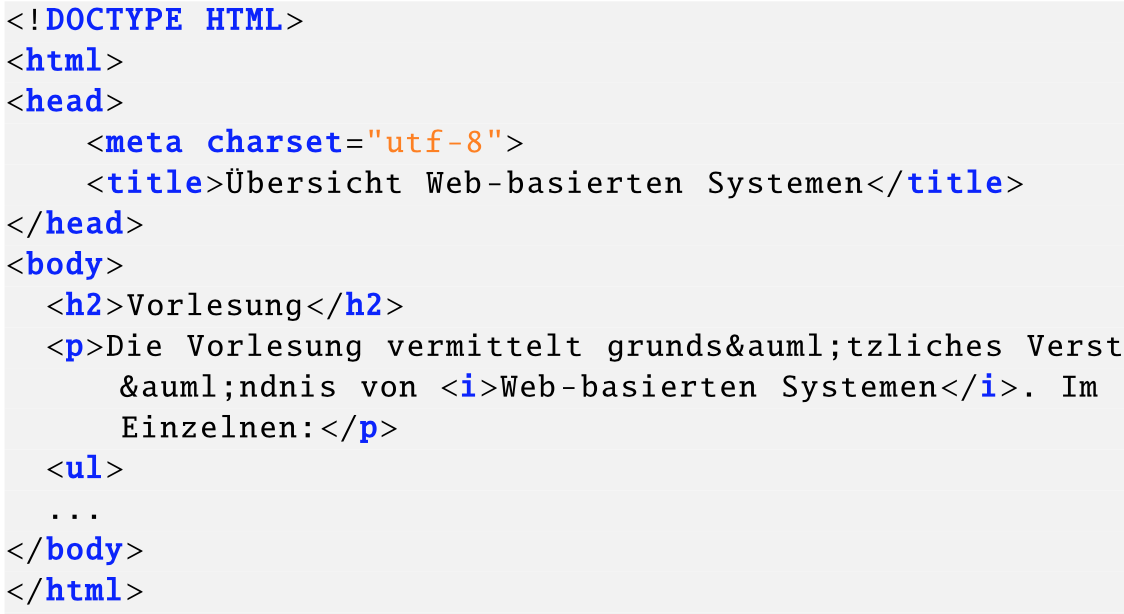
CSS
- Motivation:
- Separate content and representation
- e.g., prevent
<table border="2" bordercolor="black">... - Goal: More flexibility by using classes and IDs
- Advantages:
- Uniform rendering of different websites in different browsers (e.g., corporate identity)
- Style definitions are centralized
- Additional design features
- Split work (designer and writer)
- Style sheet consists of several rules
Rule Structure
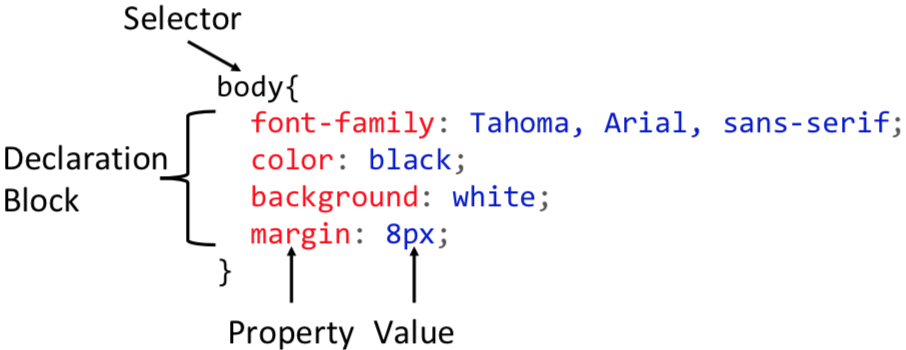
- Rule consists of a selector and several declarations
- Components:
- Selector
- Declaration Block
- Property
- Value
Reference in HTML
linktag (external source)styletag (local definition)styleattribute (for specific tags)- Order of importance:
- Attribute (of a tag)
- Local definition
- External source
Selectors
- Tag name/type
- Classes
- Tag may contain several classes
- cf. format template
- e.g.,
class="class" - e.g.,
.class {...}
- IDs
- Tag may have at most one ID (unique)
- e.g.,
id="test" - e.g.,
#test {...}
- Wildcard
* - Group selector:
- Combination of multiple selectors
- e.g.,
h1, h2, a
- Descendant selector:
- Select children/descendants
- e.g.,
p.text > span.red:hover
- Pseudo-selectors:
- e.g.,
:link,:visited,:first-child - Interaction:
:hover,:active
- e.g.,
- Tags for styling without properties:
div: Block tagspan: Inline tag (continuous text)
Variables
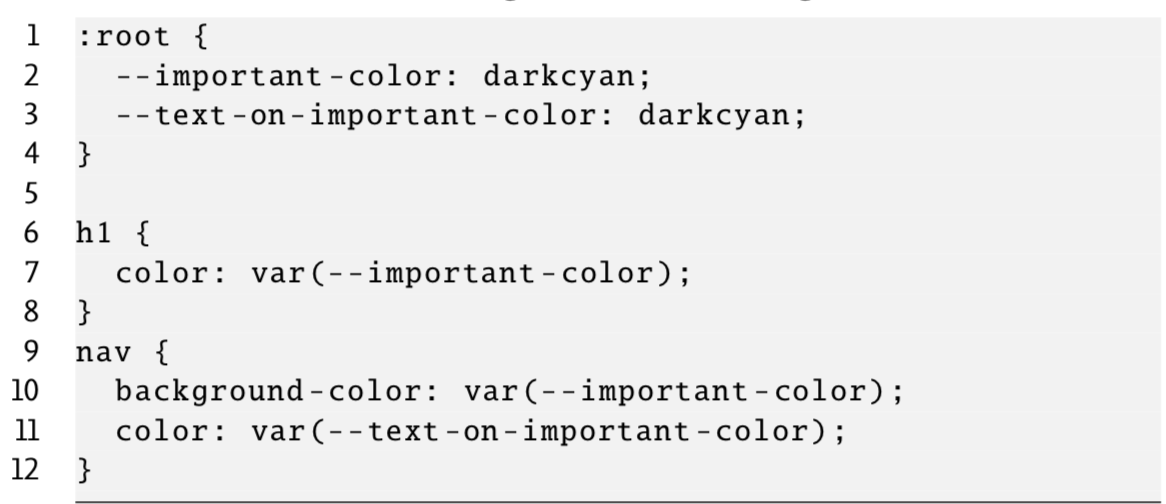
- So-called custom properties
- Define:
--foo: <value> - Access:
var(--foo) - e.g.,
:root { --foo: #fff; }
Properties
- Size (width, height, margin)
- Font (size, family, weight)
- Font family either needs to be installed in the browser or via dynamically loaded Webfonts
- Color
- Predefined names (e.g., red, green)
- RGBA (e.g.,
rgba(15,0,255,0.9)) - Hex (e.g.,
#1000FF) - Background color
- Position
- Visibility (block, none)
Measures
- Relative:
em: Width of letter mrem: Font size of html elementvw: View width (in percent)
- Absolute:
- Pixel
px - Millimeter
mm - Centimeter
cm - Inch
in
- Pixel
- Colors:
color,background-color
Box Model
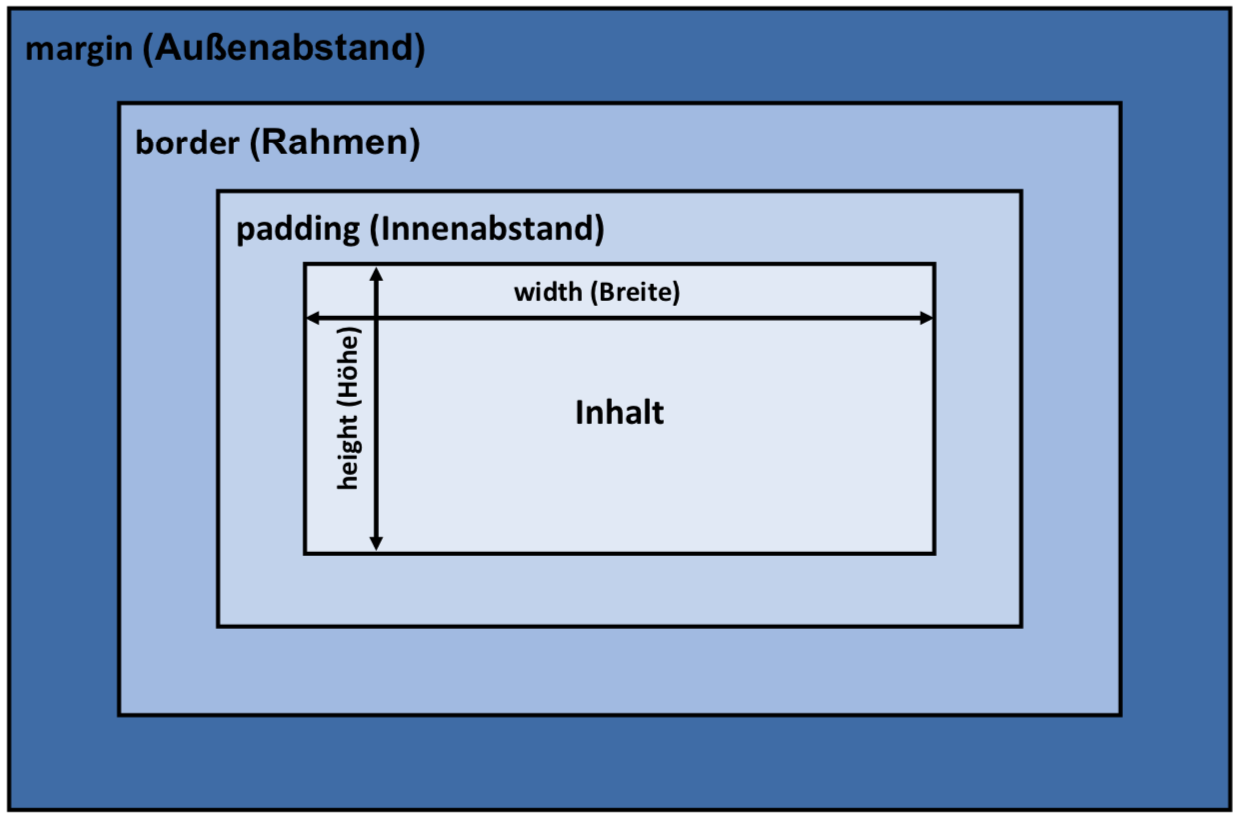
- Components of a block:
- Margin
- Border (Background-image goes up to the border)
- Padding
- Content
- Use the
box-sizingpropertycontent-box: Default,widthapplies to the content (not to padding, border and margin)border-box:widthapplies to the border (content + padding + border)