The Browser
Architecture of Modern Browsers
- Here: Chromium
- Focus:
- General understanding of architecture of browsers
- Fusion of HTML, CSS and JS
- Improving performance and security
Generic Architecture
- Reference architecture for browsers
- Result of the analysis of multiple browsers
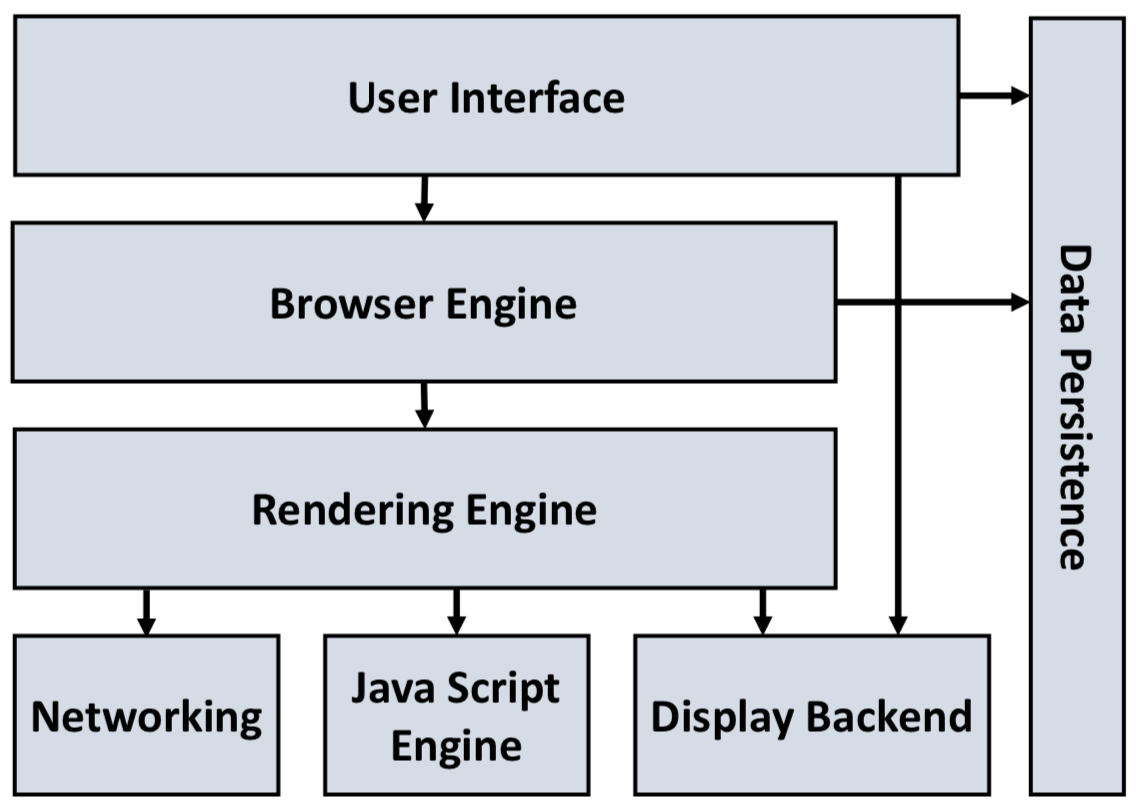
- Components:
- User Interface
- Browser Engine
- Rendering Engine
- Networking
- Java Script Engine
- Display Backend
- Data Persistence
User Interface
- Layer between the user and the engine of the browser
- Surface: Toolbar, Border, Settings mask
- May be embedded in the desktop manager of the system ==What is the Desktop manager?==
Browser Engine
- Implements basic functions
- e.g., load an URI, Browser history, Page Reload
- Provides interface to the Rendering Engine
- e.g., may query the state of rendering engine
- e.g., change settings of the rendering engine
- Provides interface to request further information of the session
- e.g., progress of loading the page, state of JS engine (warnings, …)
Rendering Engine
- Rendering of HTML and CSS
- Important: Render sites equally
- Integration of graphics
- Define layout of website
- Positioning of all elements
- Re-rendering after a change of the view port
- Central components: HTML- and CSS-parser
Networking
- Support the data transfer (HTTP, HTTPS, FTP)
- Conversion between encodings
- Support of different MIME types
- May support the caching of data
JavaScript Engine
- Support of JavaScript (ECMAScript)
- Interaction with the rendering engine
XML Parser
- Formerly, a separate component
- Nowadays, part of Rendering Engine
Display Backend
- Provide interface to desktop manager and OS
- e.g., provide look-and-feel of the OS (fonts, colors)
Data Persistence
- Manage session data (e.g., cookies, …)
- e.g., Bookmarks, Browser settings
- Caching (of resources)
- Security information: Certificates, etc.
Architecture of Firefox Quantum
- Firefox 57.0 Firefox Quantum (2017)
- Quantum is the also name of the Rendering Engine
- Meanwhile Firefox 70.0 (Firefox Browser)
- Important:
- Article is actually about the Rendering Engine
- Goal: High performance
- Most components are executed in parallel because request are processed in parallel
Simplified Overview
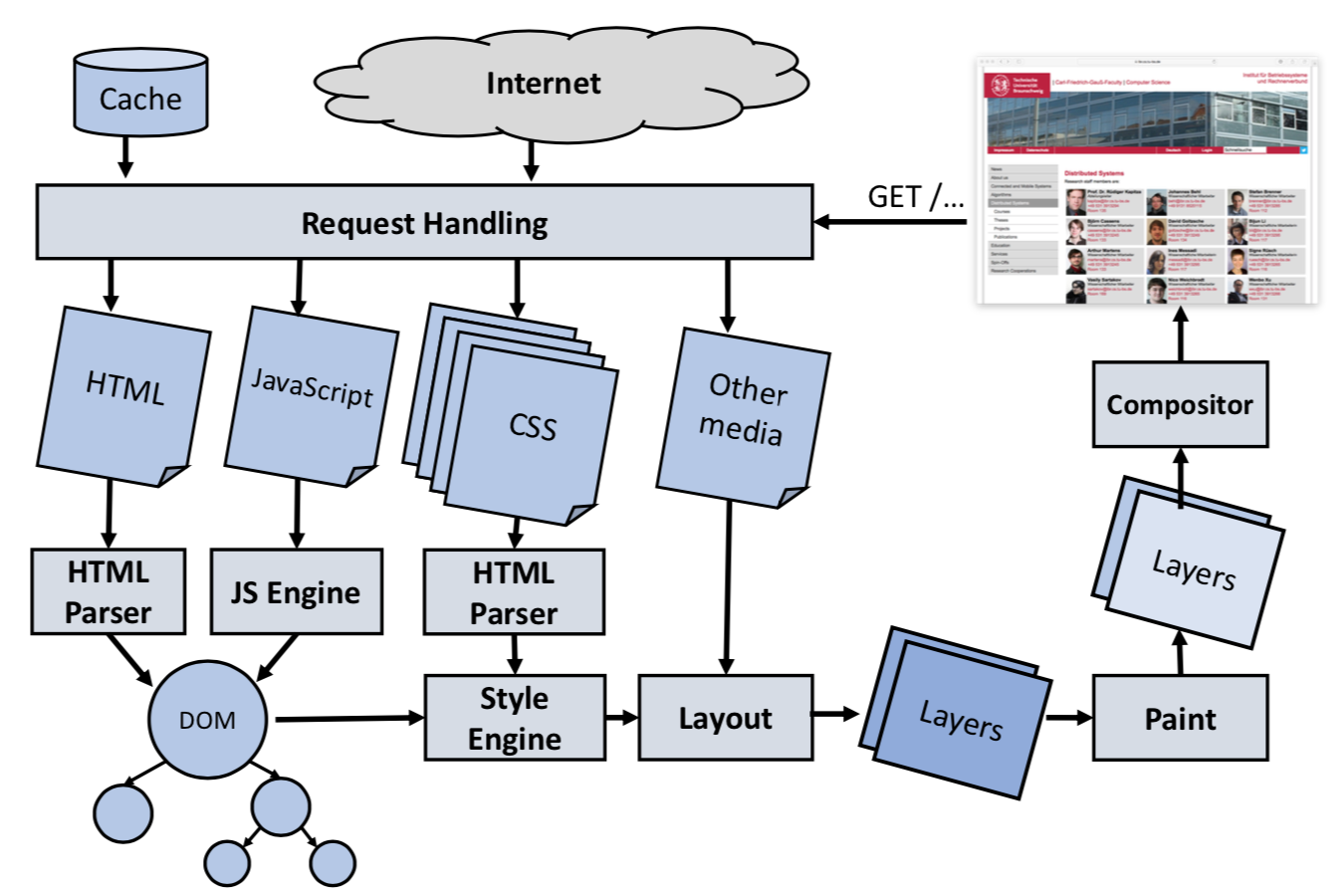
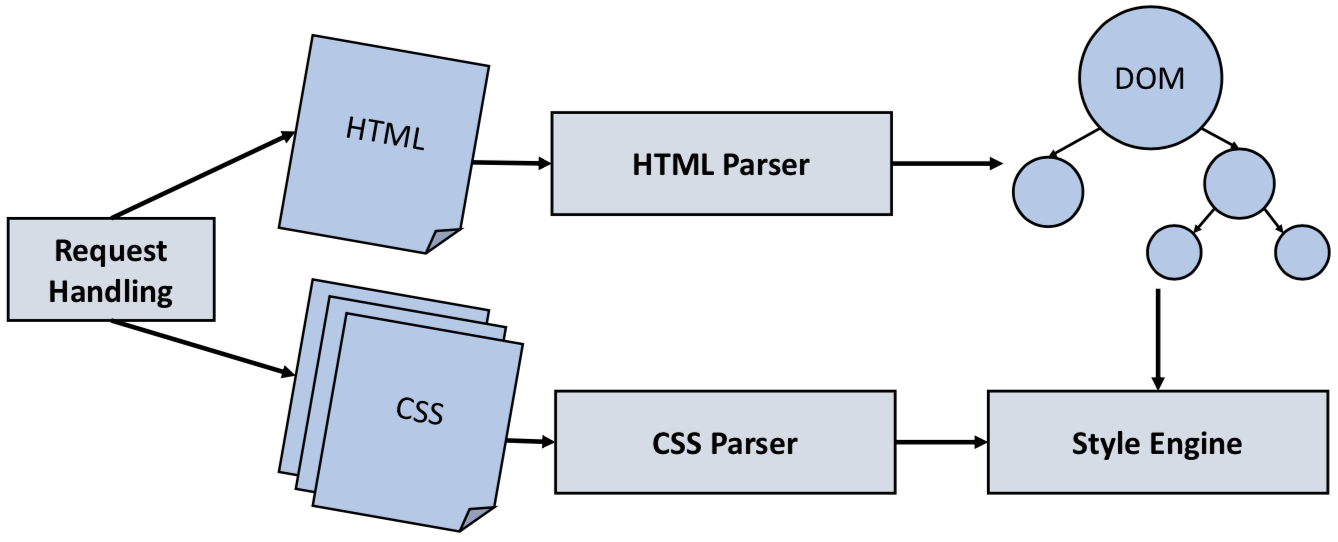
- Load and Parse (Result: DOM)
- CSS Processing
- Creation of Layout
- Rendering in Browser
Load and Parse
- Request Handling module:
- Load remote data (e.g., HTML, CSS, JS, images, etc.)
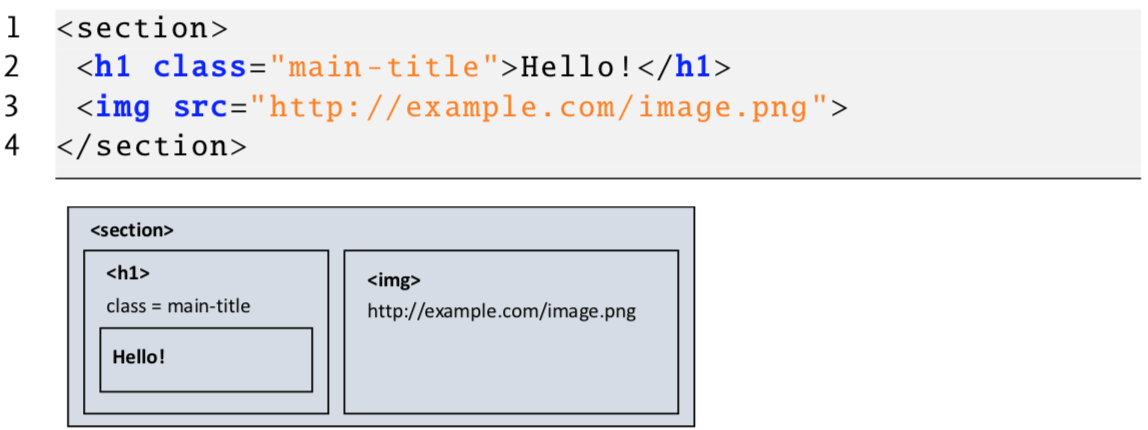
- HTML parser converts HTML document into DOM tree
- Style and script data referenced in HTML are loaded and processed
- Scripts may modify the DOM before the complete HTML document is parsed completely
CSS Processing
- Style engine parses the CSS and applies the rules to the DOM
- The computed style is the style of an element after the CSS parsing (here, the rules of importance fire)
Creation of Layout
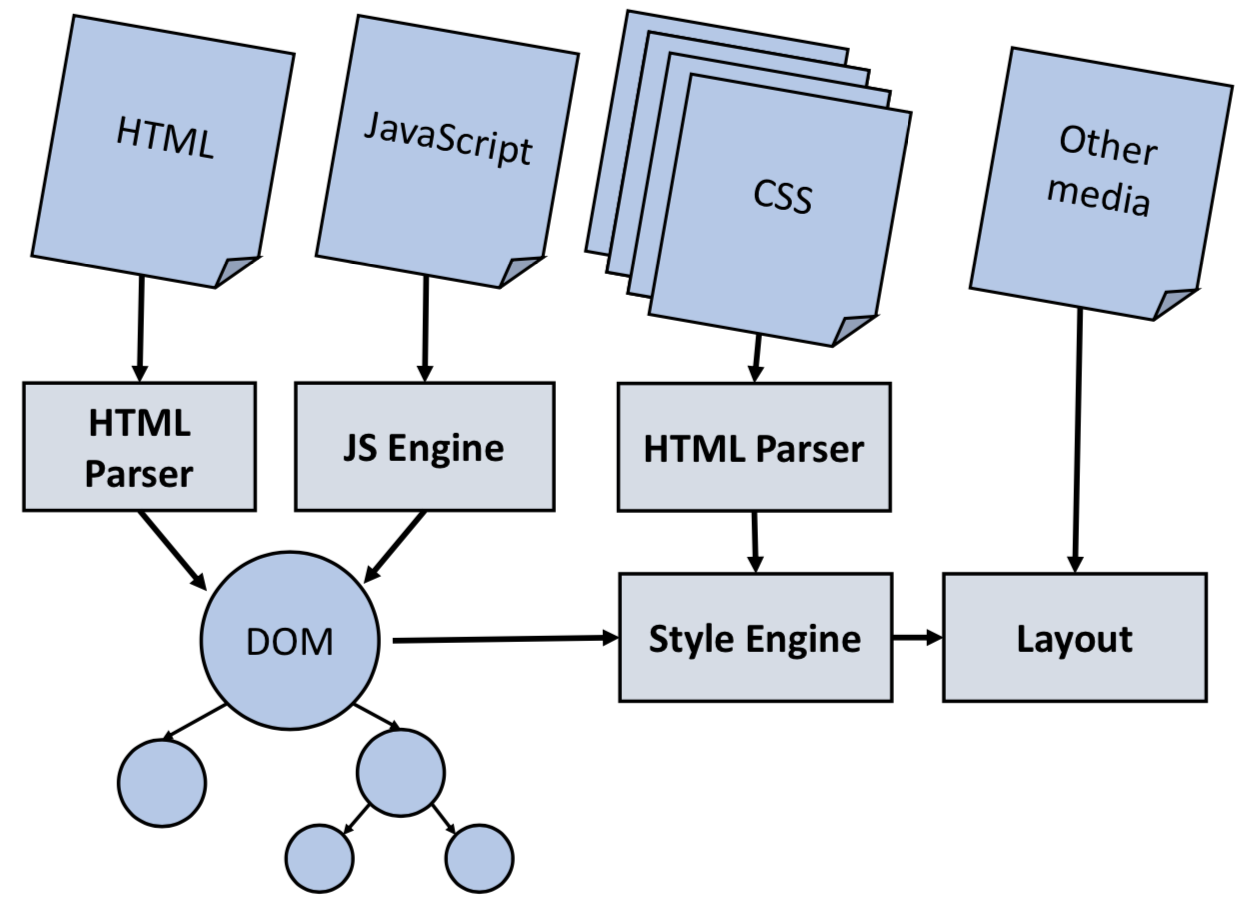
- DOM and style information are processed by layout engine
- Layout engine calculates the layout based on the window size
- Each element is computed independently
- e.g., size of elements and applying style rules
Rendering in Browser
- Final step: Computed elements and styles are rendered
- If the view port is changed (e.g., resize, scrolling) the site is re-rendered
- Browsers often compute more than the current viewport (because the user may change this immediately)

Multi-Process Architecture and Isolation of Web Applications
- Here: Chromium Project
- Motivation
- Browsers are getting more complex
- Web applications are getting more complex
- e.g., Single Page Applications, Progressive Web Applications
- Many errors in browsers and attacks
- Requires robust browser architecture
- Former architecture:
- Browsers are monoliths
- All components have full access to resources (e.g., file system, memory)
- Problem: One error may break the entire browser
- Problem: Bad isolation and bad performance
- Goals:
- Add an abstraction layer for better isolation of the single components
- Isolation concepts must be compatible to existing assumptions of the system
- Result:
- A multi-process architecture provides more Security, Fault tolerance, Resource Management and Performance.
Chromium Architecture
- Threat model
- Attacker (remote) knows a vulnerability in the code of the browser
- Attacker must trick the user into loading specific malicious code
- Attacker’s goals:
- Installation of malware (e.g., keylogger)
- Eavesdrop sensitive documents/data
- NOT CONSIDERED: Vulnerabilities of web sites (e.g., phishing, XSS)
- Components
- Rendering Engine (website-code)
- Browser Engine (system-code)
- Common functions: Parsing of URLs and Unicode
- Processes (granularity):
- Simplified:
- Each tab gets own Rendering Engine instance (including warnings of site content)
- Except:
- Important information (e.g., HTTPS error messages, phishing warnings) are shown in a separate instance
- All Plug-ins are run in the same process
- Simplified:
Rendering Engine
- Purpose:
- Contains the complex code of the web application (thus, is error prone)
- Responsible for HTML/XML/CSS/XSLT parsing
- Decode images/SVG
- Build the DOM
- JavaScript Interpreter
Browser Engine
- Purpose:
- Contains code which can access the underlying system
- Note: Much more powerful than the Architecture presented above (Chromium)
- Manage persistent data
- Graphic elements (e.g., window manager)
- Browser GUI (e.g., location bar)
- Network functions
- Interfaces:
- Rendering
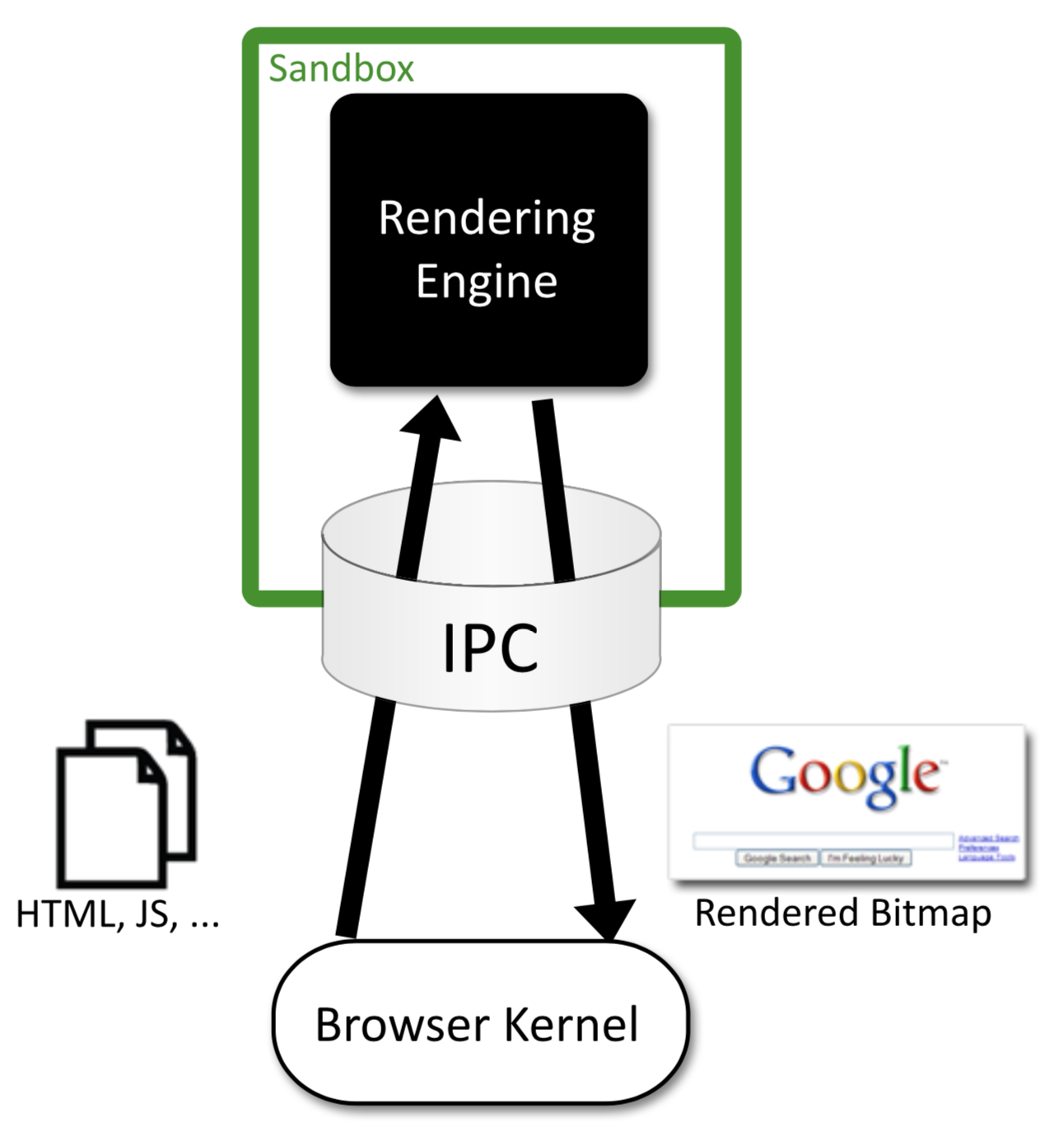
- Rendering Engine sends rendered page to the Browser Engine
- Browser Engine sends data to graphic interface
- Problem: Data is copied twice
- User input
- User input is send from OS to Browser Engine
- Either direct evaluation or transmission to Rendering Engine
- Rendering engine only receives events which are addressed to the running web application
- Persistent memory
- Sandbox must ensure that Rendering Engine can not access files (e.g., in case of an attack)
- Information about up- and downloads are handled by the Browser Engine
- e.g., default path, window with progress
- e.g., dialog if same file exists
- Goal: Prevent overwriting of files
- Network
- Network traffic is handled completely by the browser engine
- Rendering Engine sends requests to Browser Engine
- Load
http,https,ftpand pass result to the rendering engine - Block
file(except user typing the URL)
- Load
- Rendering
Sandbox
- Contains the Rendering Engine
- Takes all capabilities of the Rendering Engine to access the system directly (sandbox)
- All important function calls are routed through the Browser Engine
Inter-Process Communication (IPC)
- Communication between Browser Engine and Rendering Engine
- Use Low-Level IPC (formerly, async named pipes)
- Advantage: Fast and efficient
- Mojo: Name of the IPC system
- Can be mapped onto different subsystem features (e.g., Unix domain sockets)
Evaluation
- Evaluation using the Common Vulnerabilities and Exposures (CVE)
- Use reports between 2007/07 and 2008/07 for IE, Firefox and Safari
- 38/87 vulnerabilities corresponding to the Rendering Engine could be prevented
- 70 % of vulnerabilities (arbitrary code execution) could be prevented using this architecture
Isolation of Web Applications
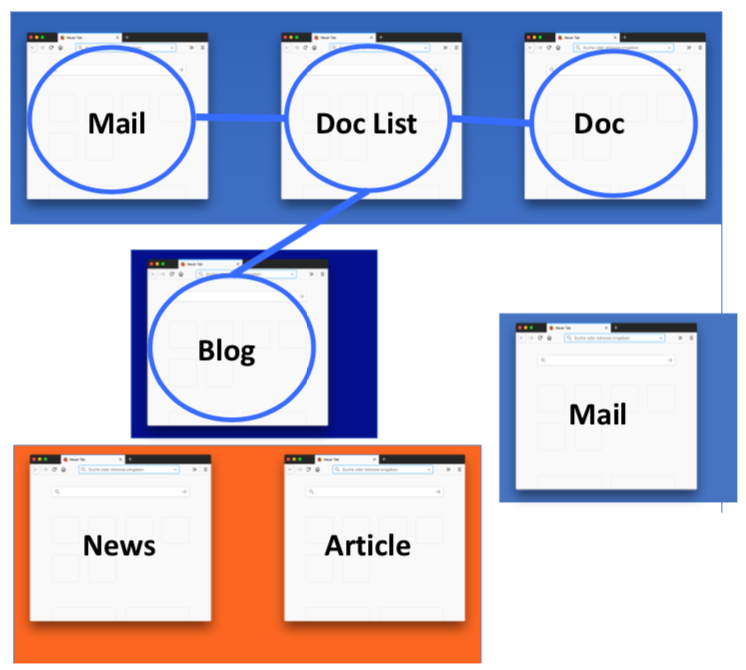
- Browser context contains multiple, independent web applications
- Question: How to map complex web applications to a multi-process architecture?
- Approaches:
- Past: All tabs to one process
- Naive: Each tab in one process
- Problem: Hard for communicating web sites to access the other’s DOM anymore
- New: One group per process
- Goal:
- Windows of a web application should be grouped and isolated (related windows and tabs)
- Should be compatible to existing web applications
- Idea: Use existing information
- One group per process
- Ideal abstraction:
- Web Program
- Set of related sites and resources which implement a service
- Web Program Instance
- A running instance of a Web Program in a browser
- Isolate using the Browser architecture
- Web Program
- Isolation technique:
- Isolate using the Same-origin policy
- i.e., protocol, host, port
- Important: Website may change
document.domain(w.r.t. known limitations)
- References between related windows
- using
window.open()(DOM of opened site)
- using
- Browsing instance: Windows are connected independently of the website
- Website instance: Intersection between Website and Browsing instance
- Isolate using the Same-origin policy
- Evaluation
- Performance: Fast reaction under heady load
- Process creation time (100 ms) irrelevant
- Much more memory consumption
 .
.
APIs
Document Object Model
- JS interface to manipulate HTML documents
- Representation of HTML:
- Tree of elements (
HTMLElement) - Use cases: Modification and search in HTML documents
- Access:
window.document
- Tree of elements (
- Styling properties:
- Can be manipulated by DOM
- Problem: Bad practice, CSS should be changed
- Use CSS classes
- Location API
- Redirection to another page
window.location.href- Attention: Script may stop directly
- Debugging:
console.log(msg)alert(msg)
Elements
- ca. 250 different properties per element
- Properties (excerpt):
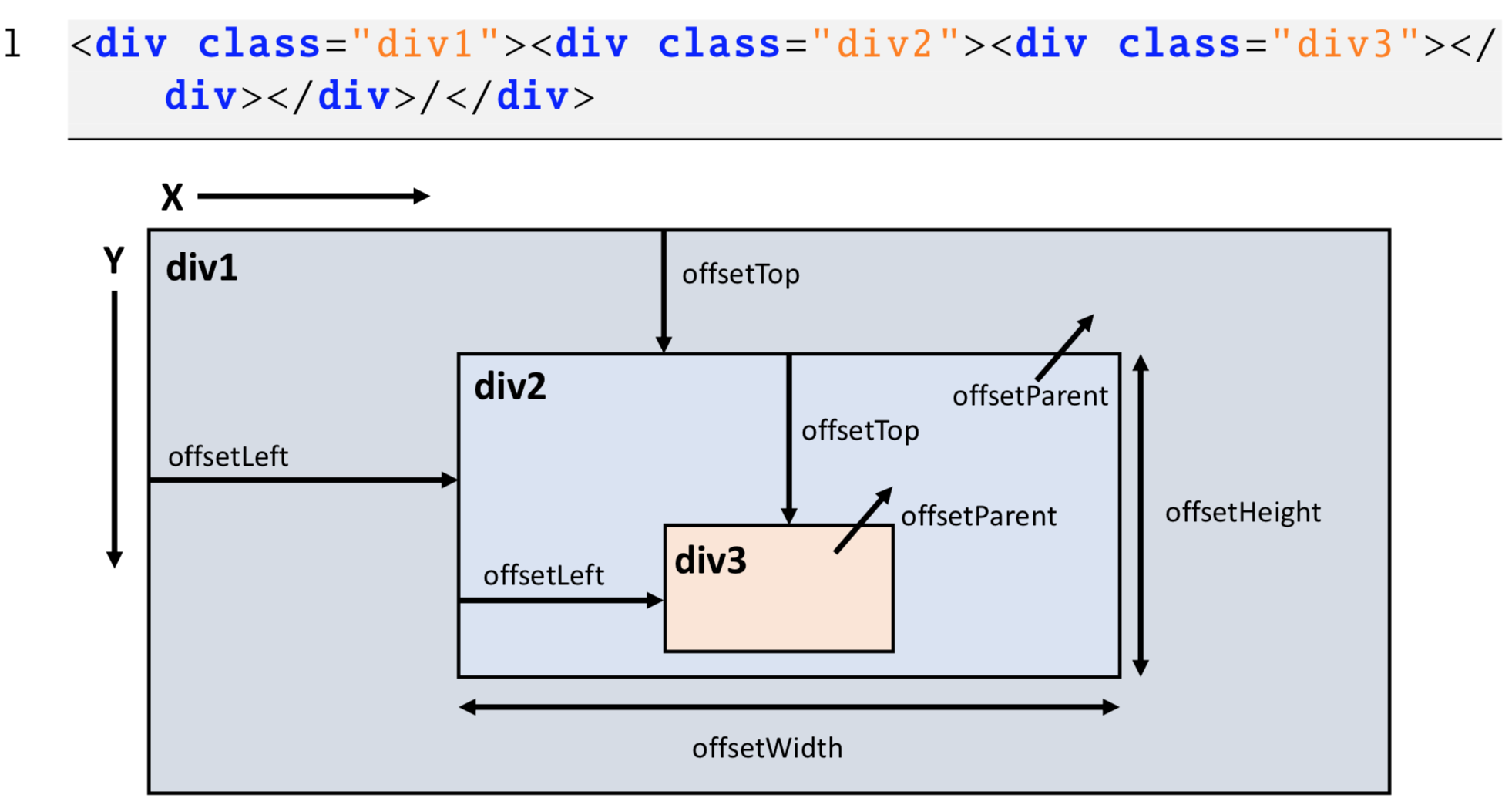
nodeName(identify elements, e.g.,DIV)innerHTML(HTML of descendants)outerHTML(HTML of descendants, including current node)style.display(visibility, bad)style.color(color, bad)image.srcclassName(change CSS class)textContent(like innerHTML but only for text)offsetParent
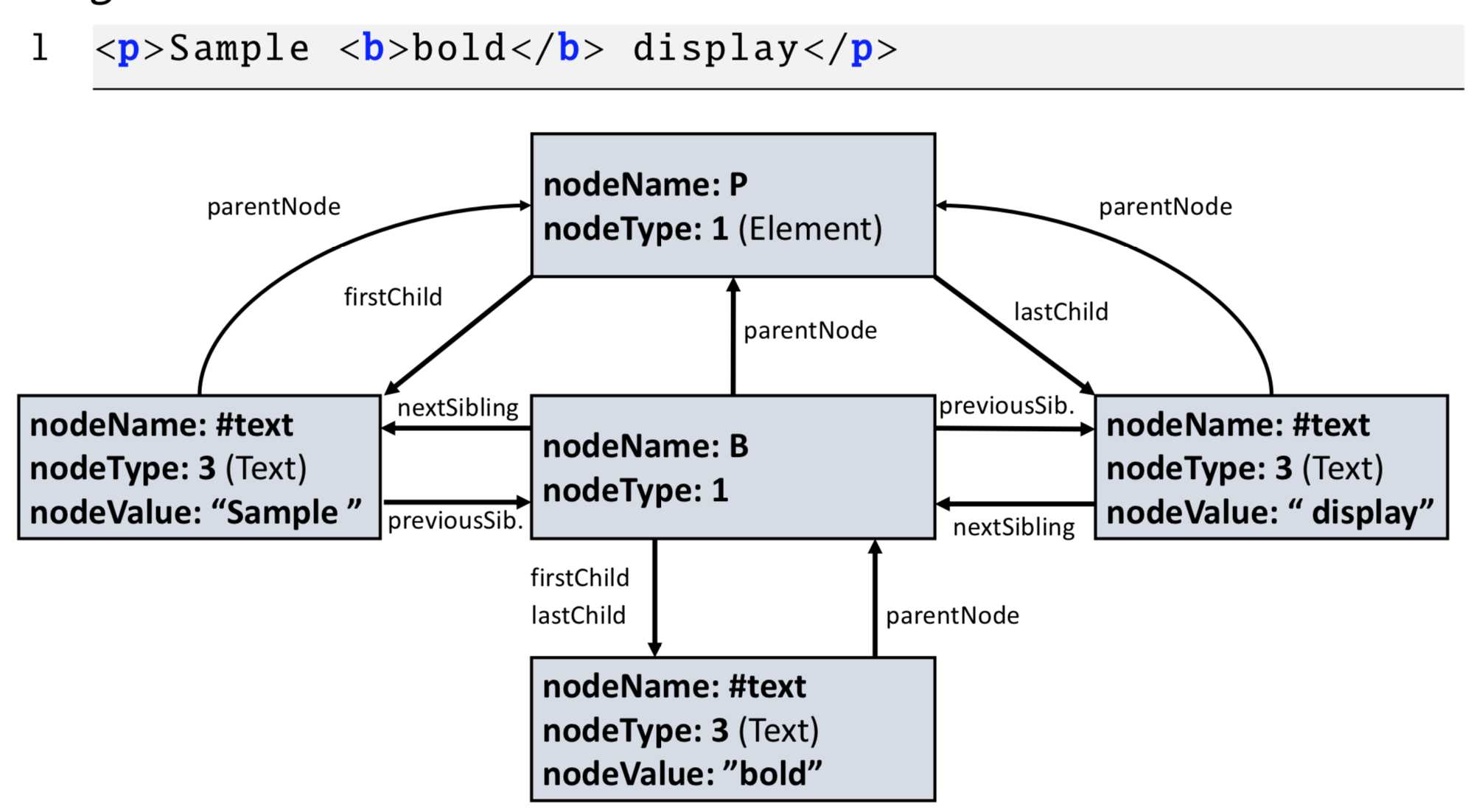
- Navigation properties (helper):
parentNodenextSibling/previousSiblingfirstChild/lastChild
- Methods to read/modify attributes:
getAttribute(k)setAttribute(k, v)
- Modification of elements:
document.createElement(<tag>)el.appendChild(<node>)- Clone:
node.cloneNode() - Remove:
node.removeChild(<child>)
Navigation
- Structure
window.document.headwindow.document.body
- Problem:
- Usage of
document.body.firstChild.nextSibling...is too strictly tailored to current structure/DOM
- Usage of
- Approaches:
- IDs:
getElementById(<id>) - Classes:
getElementsByClass(<class>) - Tag names:
getElementsByTagName(<tag>) - CSS selectors:
document.querySelectorAll(<selector>)
- IDs:
Positioning
- DOM can be used to change the position of elements
- Properties:
offsetLeft, offsetRight, offsetParent, left, top- Values are relative to
el.offsetParent
- Usually, the browser positions the elements
- Developer can overwrite positioning
el.style.position = "absolute"el.style.left = "40px";- Browser does not use
position=absoluteelements for the calculation of the layout
- Element may change its positioning context:
absolute: Rendered independently (element is ignored for the positioning)relative: Element is computed but then moved w.r.t. its positioning coordinatesstatic: Default.
Events
- Interaction between the DOM and JS via events
- e.g., mouse movements, clicks, entry/leave of HTML elements, change of elements, timing events, key events
- Important events:
- Content of page has changed
- Page and images are loaded successfully
- Errors
- Event-oriented programming:
- Code is executed only by events
- Routines should be fast, because JS is blocked
- Use additionally to timers and Web workers
- Advantage:
- Easy to implement
- Disadvantage:
- Bad load for multi-process systems
Event Handling
- Event handling routine need-to-know:
- Type of the event (
Eventobject or a subclass) - Source of the event
- Code to execute
- Type of the event (
- Approaches:
- Event handler (e.g.,
el.addEventListener(...)) - Directly in the HTML (e.g.,
onclick="...")
- Event handler (e.g.,
Eventobjecttype(e.g.,click,mouseDown)timeStampcurrentTarget(element to which the event handler is bound)target(element which released the event)
- Types of events:
MouseEvent(with propertiesbutton,pageX,pageY,screenX,screenY)KeyboardEvent(with propertieskeyCode,charCode)
Order of Event Execution
- Scenario:
- Hierarchy of elements
- The bottom most element was clicked
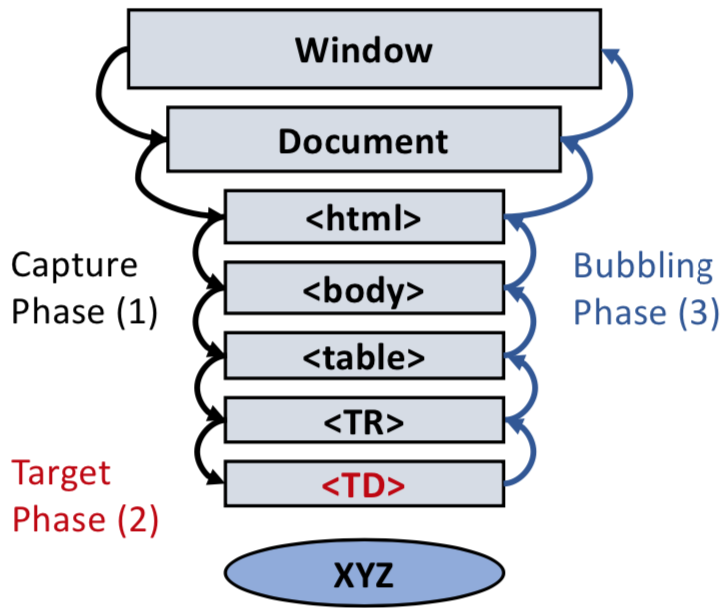
- Phases:
- Capture Phase
- Top-down approach
- Registration:
e.addEventListener(type, handler, true)
- Target Phase
- Bubbling Phase
- Bottom-up
- Registration:
e.addEventListener(type, handler, false)
- Capture Phase
- Stop the propagation:
event.stopPropagation(); - Mostly, events register on the bubbling phase
Timer
- Use case: Animations, regular repeating of stuff
- Call after a specific time:
token = setTimeout(func, 50)- Here: 50 milliseconds
- Call periodically:
token = setInterval(func, 50)
- Cancel:
clearInterval(token)
Concurrency
- JS handles events sequentially
- Run to completion semantics:
- No multi-threading
- No concurrency
- Simple model
- Problem:
- Realize background tasks is hard
- Solution: Web Workers
- Like a script run in the background
- Events are still handled
- Background code should be placed in a separate file
- Communication:
postMessage() - Quit:
w.terminate() - Restriction: Web workers do not have any access to
window,documentorparent

Data Persistence
- Formerly, only Cookies were available
- Used for user re-identification / session management
- Current techniques:
- Web Storage:
- LocalStorage and SessionStorage
- Cache Storage:
- For offline applications (experimental)
Service Workerinterface
- IndexedDB:
- Transactional database managing JS-based objects
- Flexible and fast access
- Web Storage:
- User re-identification:
- Problem:
- HTTP requests are stateless
- But users need to be re-identified for sessions
- Formerly: Cookies
- WebStorage
- Problem:
Cookies
- Formerly used for sessions and tracking
- Headers
- Response:
Set-Cookie: foo=bar - Request:
Cookie: foo=bar; baz=bar
- Response:
- Limitations:
- Only send in the origin of the server
- Expiration date
- Size restriction (4 KB)
- Number of cookies (max. 50)
- Use cookies as client-side storage?
- Bad idea
- Users have control over cookies (CRUD)
- Users are skeptical against cookies (because of tracking,
Do Not Trackheader)
- Security
- Users may modify/ceate cookies
- Encryption protects Confidentiality and Integrity, but cookies are still deletable
- Maybe, use references for server-side data
HttpOnlyflag: Protect cookies against scriptsSecureflag: Transmit cookies only over HTTPS- Problems: XSS + CSRF
- Advantage:
- Good for sessions
- Disadvantage:
- Bad for client-side persistent storage
WebStorage
sessionStorage: Persistence tailored to runtime of tab/windowlocalStorage: Persistence completely tailored to domain- Access:
getItem(), setItem() - Changes of the storage:
StorageEvent - Limitation: 10 MB
Communication
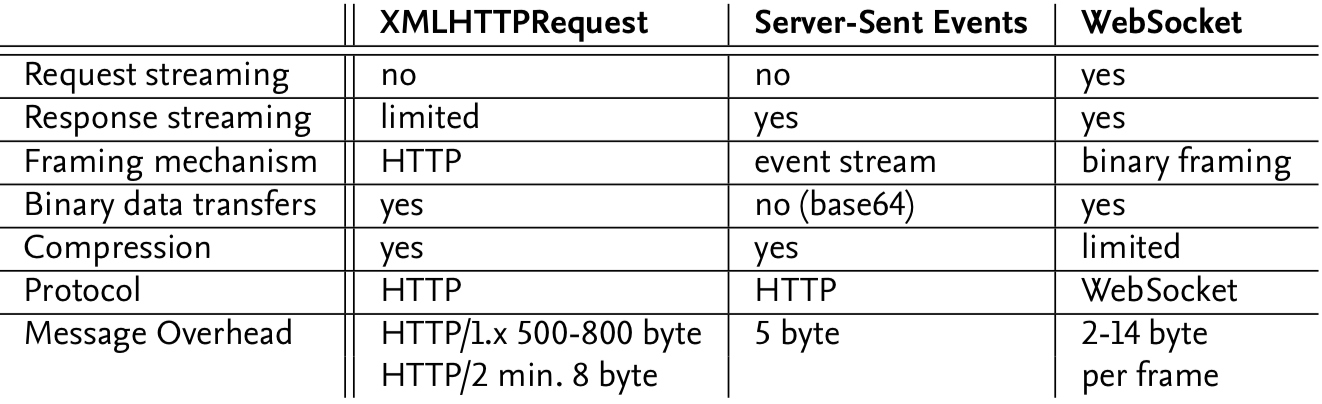
XMLHttpRequest (XHR)
- Motivation:
- Updating the page content requires a refresh
- XHR: Scripts could send requests in the background (basis for AJAX)
- History
- 1999: XHR implemented in IE 5 (XHR and XML were connected quasi randomly)
- 2006: W3C Draft
- 2008: XMLHttpRequest Level 2
- 2011: Drafts we merged to XMLHttpRequest specification
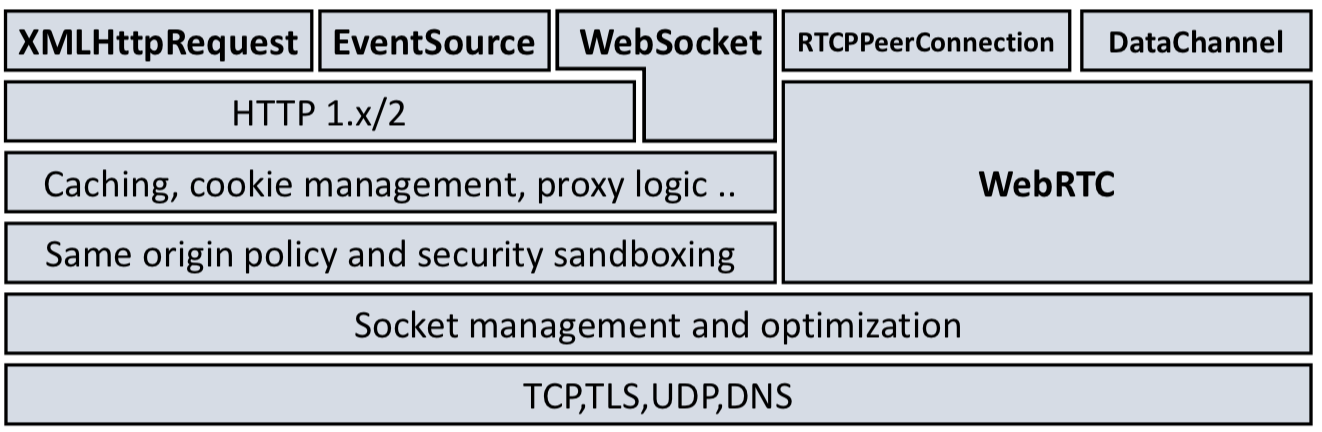
- XHR is communication interface:
- Request management, caching, authentication, security mechanisms
- Adding headers is possible (
setRequestHeader()) - Restricted headers:
Access-Control-*,Cookie,Origin,Refererare prohibited (Browser deletes them)Originheader must be protected due to the Same-Origin-Policy (e.g., read cookies)
- Summary:
- Support interactive websites without reloading them
- Comfortable / easy
- Real-Time Notifications are not optimal
- Not strom-orientiert (can be emulated)
Implementation
- Supported formats:
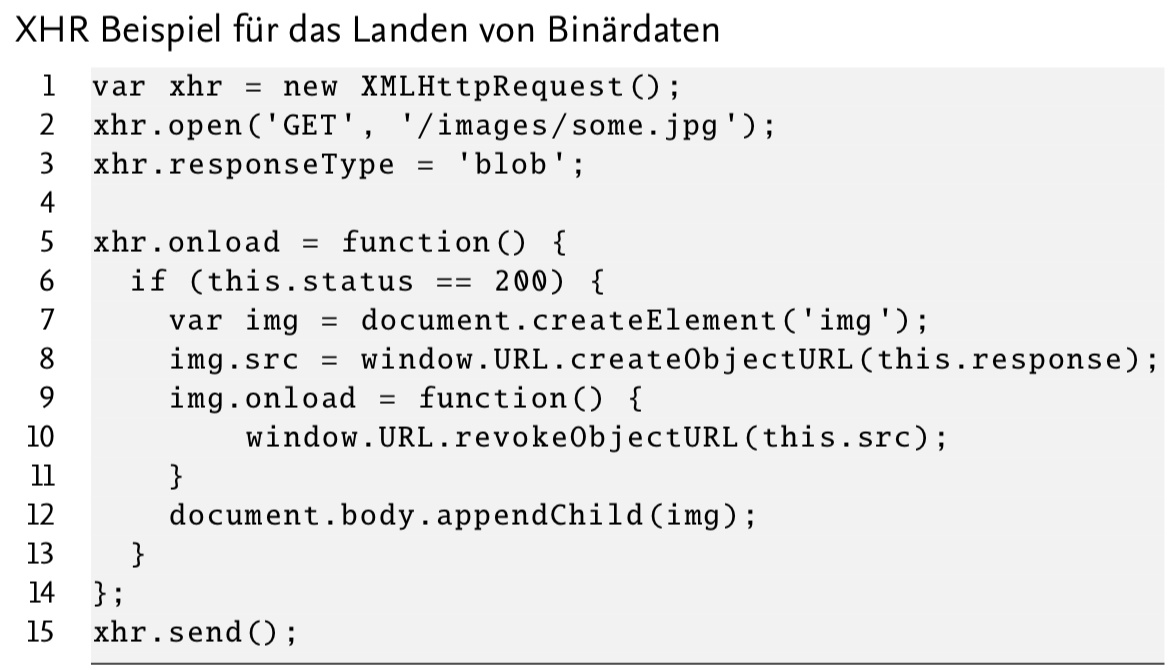
ArrayBuffer(fixed-length binary data)Blob(binary data)Document(XML, HTML file)JSONText- Specification:
Content-Typeheader orxhr.responseType = '<type>'
- Events:
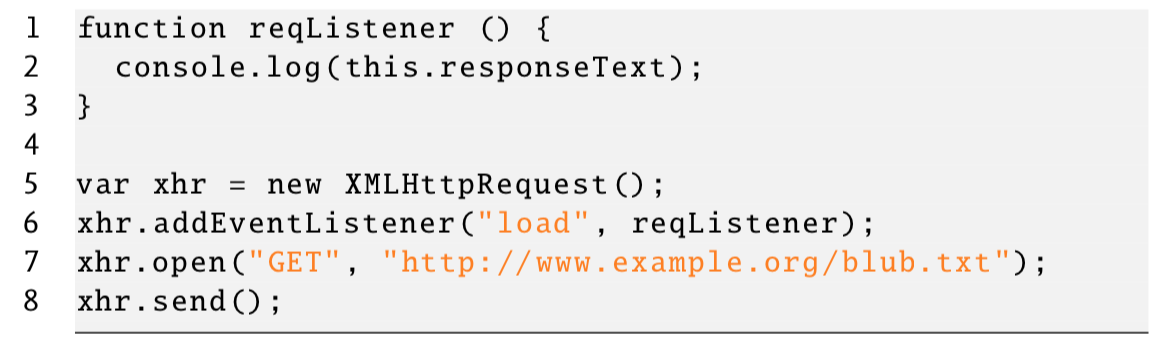
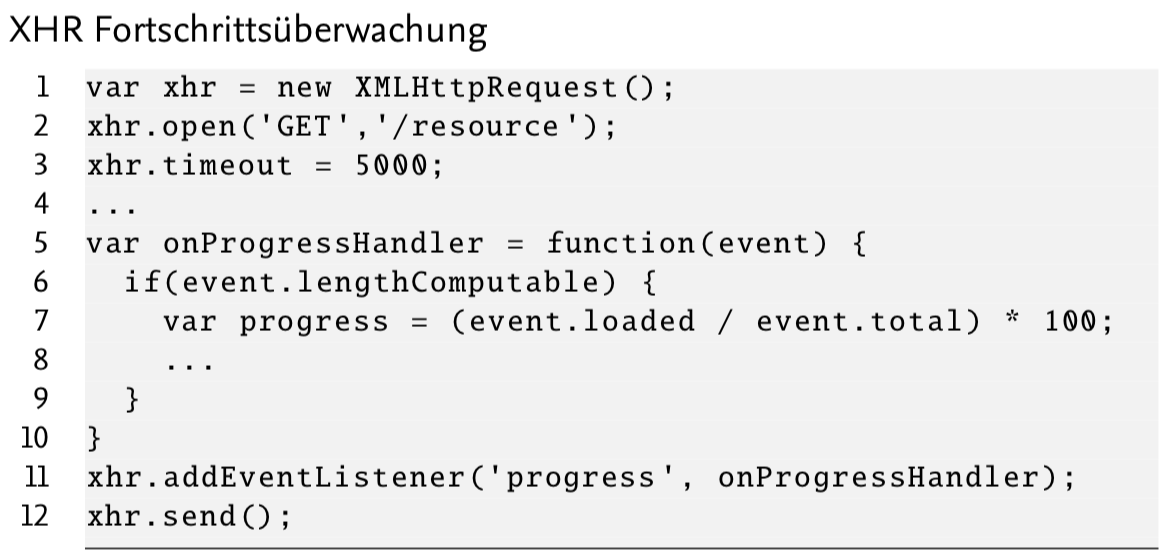
readystatechange(state has changed)loadstart(request started)progress(data is being sent/received)load(request successfully finished)loadend(request finished; even if failed)abort/error
- Possible values for
readyState:0 UNSENT:open()was not called1 OPENED:send()was not called2 HEADERS_RECEIVED:send()called and headers are available3 LOADING: Download not finished but part-response available4 DONE: Operation finished
- Properties:
xhr.response(response data)xhr.status(status code of the response)
- Methods:
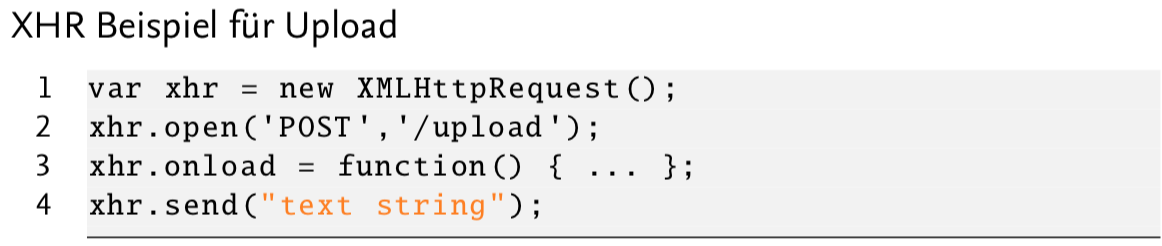
xhr.open(<method>, <uri>)xhr.send(<data>): Send request (data is optional)
Examples
Simple GET:
 Binary data:
 Upload:
 Progress:
Real-Time Notifications
- Motivation:
- Client is notified if the server has new messages/data
- Approaches:
- XHR-Polling (naive)
- Comet
XHR-Polling
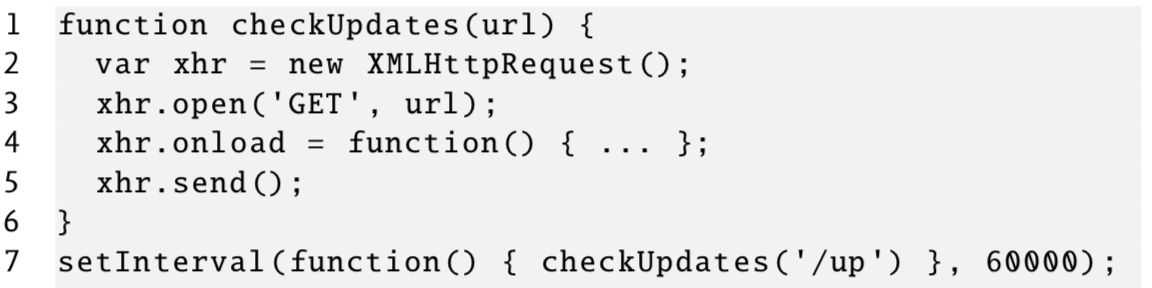
- Send every \( k \) seconds a request
- Request/response pair has 800 Byte overhead
- Problem:
- Flooding
- Energy consumption on mobile devices
- New messages are only sent in the polling interval
Comet
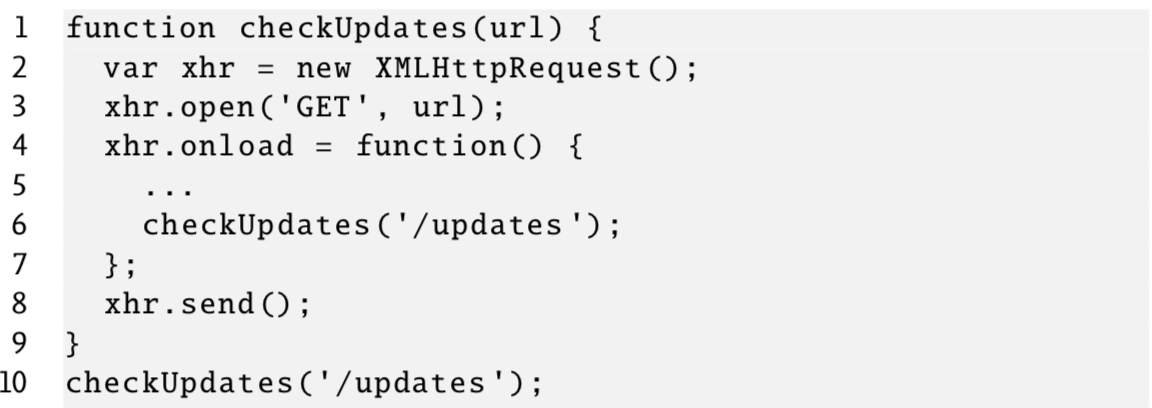
- Like a Ping-pong ball
- Client sends a request to server
- Server keeps the request and sends a response if a new message occurs
- If the client receives a response she sends a new response
Cross-Origin Resource Sharing
- Scenario:
- Scripts wants to receive resources from a foreign server (usually prohibited due to the SOP)
- Foreign server may decide which origin may send requests
- Browser protects the user by enforcing the policy
- Client headers:
- Request if the desired method and the desired headers are allowed
Access-Control-Request-Method: POSTAccess-Control-Request-Headers: X-Frame-Options
- Response headers:
Access-Control-Allow-Origin: *- Every origin is allowed
Access-Control-Allow-Methods: GET, POST, PUTAccess-Control-Allow-Headers: X-Frame-Options
- Request types:
- Simple cross-origin requests:
- Methods
GET, POST, HEAD - Standard Content-Type
- Standard headers
- Methods
- Complex cross-origin requests:
- Custom headers, credentials, Cookies
- Requires a preflight request (method
OPTIONS)
- Simple cross-origin requests:
Server-Sent Events
- Motivation:
- Provide real-time notifications
- XHR is not practical (flooding)
- Two components
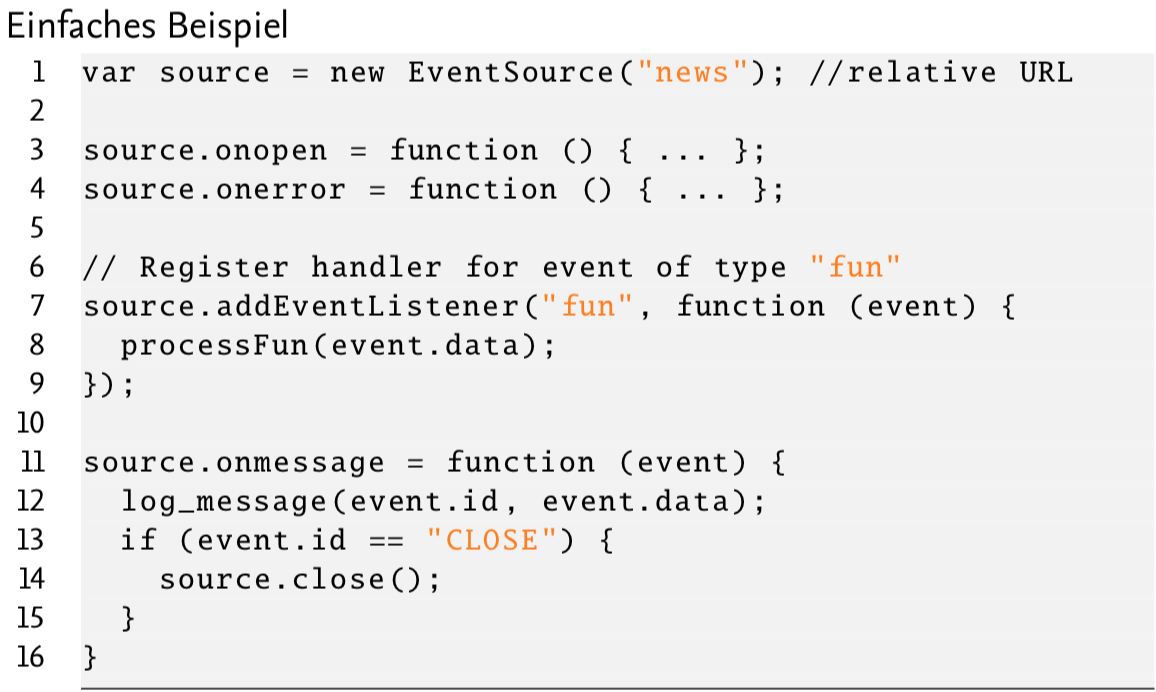
- EventSource interface:
- Browser-side
- Handling the push notifications from the server
- stromgewahrtes Data format (on top of HTTP which is verbindungsorientiert)
- EventSource interface:
- Properties
- SSE provides a stromorientierte message interface (raw stream of information)
- Support for the re-establishment of lost connections (using message IDs)
- Compression (gzip) is possible
- Workflow:
- Establish a connection
- Received data is processed (e.g., find message borders)
- If a message is identified, the event is fired
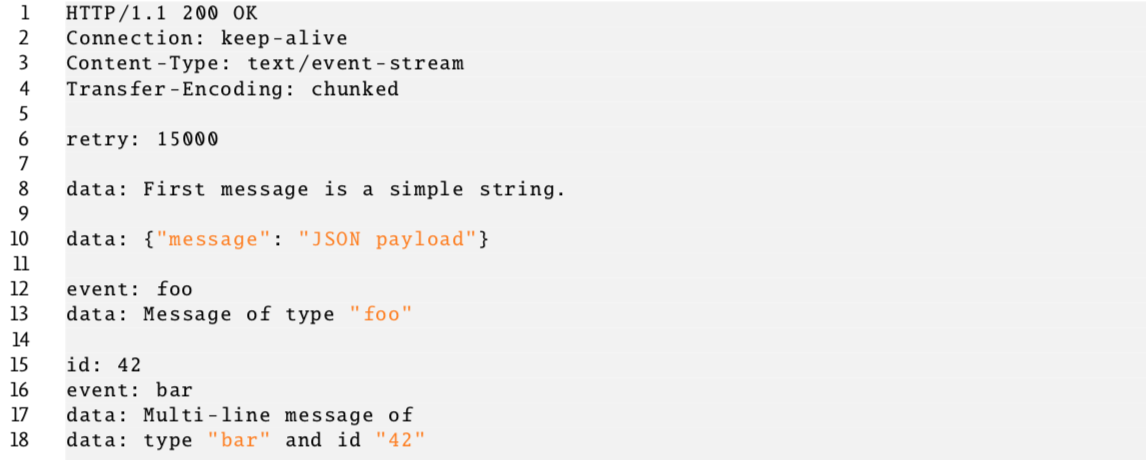
- Event Stream Protocol
- Request:
- Browser sends regular HTTP GET
Accept: text/event-stream- Request SSE events
- Response:
- Server sends a stream of messages
Transfer-encoding: chunked
- Request:
- Format:
- Support text- and JSON-based messages
- Messages may have a type
- Messages may have an ID
- Connection lost:
- Client stores message IDs (knowing which message is missing)
- On start, the server proposes an interval after which the connection should be re-established
- If the connection is lost, the browser can send a
Last-Event-ID: 42header - e.g.,
GET /stream HTTP/1.1Accept: text/event-streamLast-Event-ID: 42
- Problems:
- No stromorientierte connection from browser to server
- UTF-8 only (bad for binary data)
WebSocket
- Motivation
- Bi-directional and stromorientiert
- Look-and-feel of unix-sockets
- Features:
- Support of the SOP
- Compatible to HTTP
- Efficient message format
- Extensible
- Trivia:
- W3C recommendation
- RFC 6455 (protocol definition)
- URI scheme:
- Protocol
ws: Plain text communication - Protocol
wss: Encrypted communication using TCP/TLS - Reason for two schemes:
- Web Sockets are usable between any two clients
- Usually, used for the communication between browser and berver
- Protocol
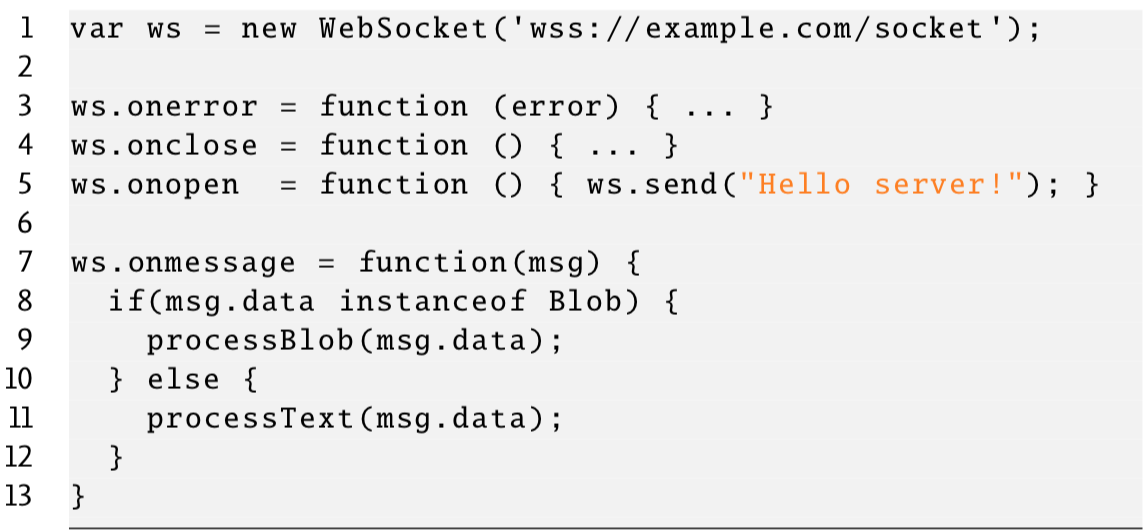
- Receiving/sending messages:
- Complete messages are sent/received (no caching required)
- Asynchronous Interface
- Supported data types:
- Text
- Blob
- Immutable
- Can be converted into ArrayBuffer
- ArrayBuffer (kept in memory)
- etc.
- Sending messages:
socket.send("foo")send()is non-blocking (asynchronous)bufferedAmount: How much data is unsent on client-side?
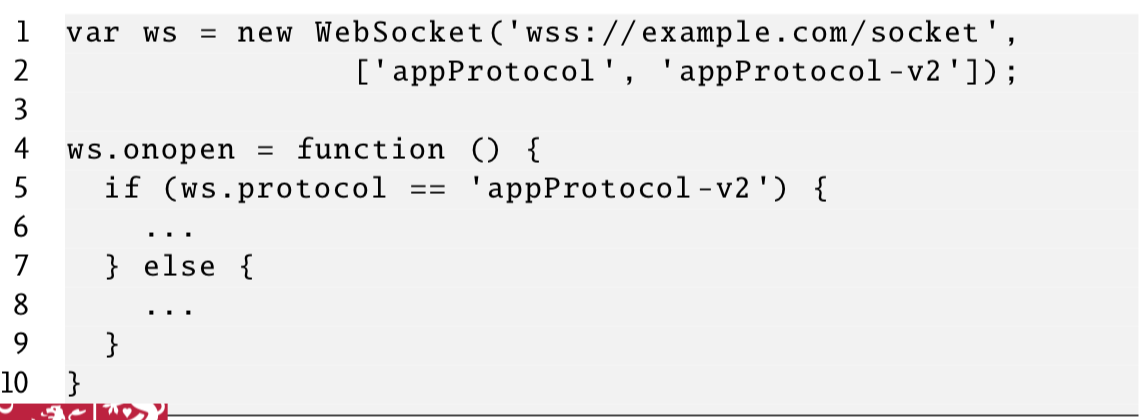
- Protocol agreement:
- Transmission is either binary or UTF-8
- Browser and server must agree on the sent format
- Protocol agreement is supported
- Example:
new WebSocket("wss://.../socket", ['proto1', 'proto2'])... if (ws.protocol == 'proto1') { ...
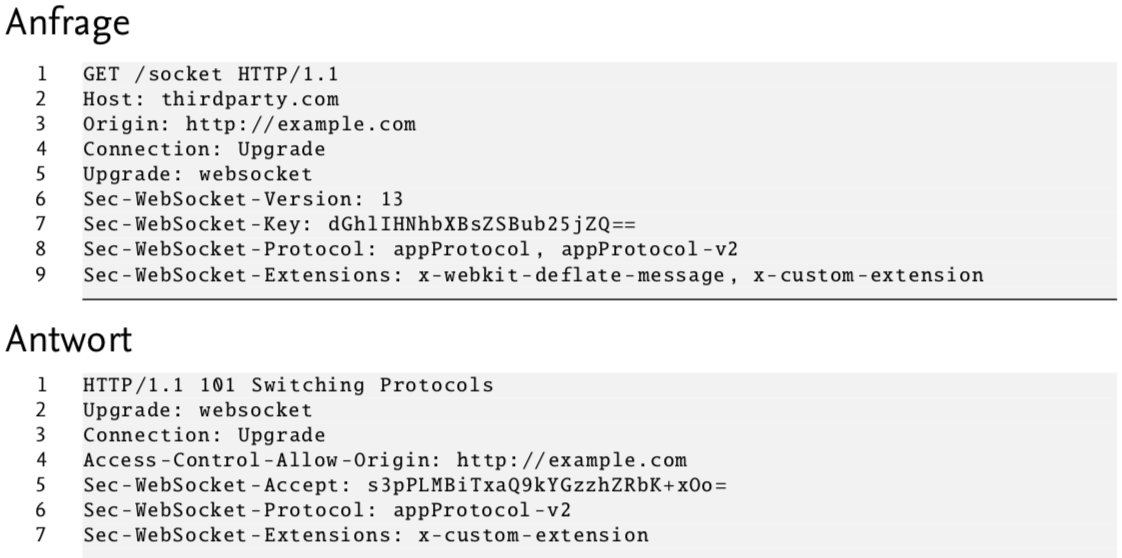
- Establish a connection:
- Use the HTTP-Upgrade
- CORS is supported
- Request headers:
Sec-WebSocket-Version: Supported version on client-side (currently,13)Sec-WebSocket-Key: Automatically generated key (not security-relevant)Sec-WebSocket-Protocol: List of possible protocolsSec-WebSocket-Extensions: List of possible extensions
- Response headers:
Sec-WebSocket-Accept: Server-response for the keySec-WebSocket-Protocol: Selected protocolSec-WebSocket-Extensions: Selected extension
 Protocol agreement (JavaScript):
 HTTP Upgrade: